By John Jordan
 SAP Material Ledger period-end closing calculates actual material costs when Actual Costing is active. In an SAP S/4HANA actual costing run, use CKMLCP to review how price differences are allocated and rolled through production levels before posting the closing entries.
This guide explains when a run is needed, how single-level and multilevel price determination differ, and what to reconcile before you complete the close.
Introduction
Material Ledger is mandatory in SAP S/4HANA. Actual Costing is optional. If you use Actual Costing, single-level and multilevel price determination handle different parts of the calculation. In the S/4HANA flow shown here, both are handled within Settlement.
Material Ledger Without Actual Costing
When Actual Costing is inactive, a CKMLCP actual costing run is unnecessary. The regular inventory and financial close still applies. You can review material transactions and price differences in Material Price Analysis. Figure 1 shows the view associated with transaction CKM3 in the illustrated system.

Expand a category to trace the underlying postings. For setup and material master settings, see Material Price Determination in SAP Material Ledger.
Single-Level Price Determination
During the period, materials with price determination 3 use standard price for preliminary valuation. The system collects relevant differences as they occur, such as purchase price differences or production order variances. The periodic unit price (PUP) is calculated at close.
Single-level price determination assigns eligible differences that arise directly for the material. For a purchased component, that can include an invoice price difference. Review how the calculation allocates those differences to ending inventory and consumption before looking at the rollup to other materials.
Multilevel Price Determination
Multilevel price determination rolls eligible differences from consumed inputs to receiving materials using the actual quantity structure. A raw material’s share of purchase price differences can flow to a subassembly and then to a finished product based on actual consumption.
Example. Assume 100 units of a component carry an eligible difference of $100, of which 60 units went into an assembly and 40 remain in stock. At $1 per unit, the simplified allocation leaves $40 with component stock and makes $60 available to roll up to the receiving assembly. Check the actual system results for quantity, valuation, and posting differences.
The CKMLCP Actual Costing Run
In CKMLCP, create or open the actual costing run for the target period and assign the relevant plants. Figure 2 shows the run used in this example. Available steps and parameters can vary by release and configuration.
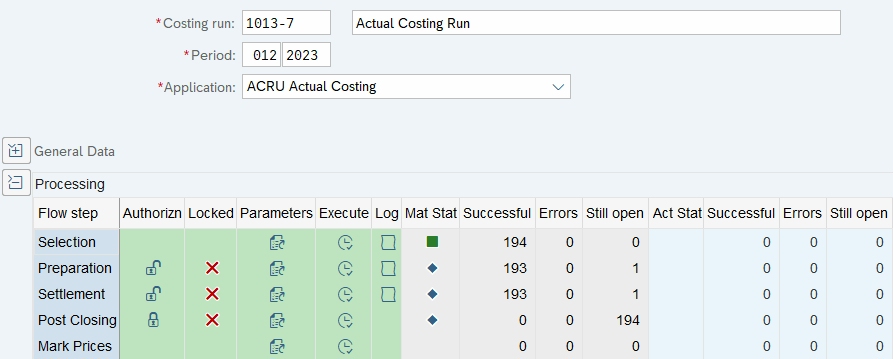
Table 1 explains what to check in the flow shown in Figure 2.
| Run Step | Purpose and Review |
|---|---|
| Selection | Identify the eligible materials and, where configured, activities in the run scope. Confirm that the intended plants and materials are included. |
| Preparation | Prepare the data and processing relationships for settlement. Review the log for items still open or in error. |
| Settlement | Calculate actual costs, including single-level and multilevel price determination. Review the calculated prices, difference allocation, and any revaluation results for your scope. |
| Post Closing | Generate the closing postings for the approved run and settings. Verify the resulting documents and reconcile the amounts. |
| Mark Prices | If your valuation policy calls for it, use the applicable price-marking process for a future period. Review the proposed prices before any release. |
Table 1: CKMLCP flow steps and review points.
Post Closing and Revaluation
The calculated PUP provides a basis for review before Post Closing. If you select inventory revaluation, eligible differences allocated to ending stock can adjust the material stock account. If you close without inventory revaluation, the corresponding amounts are handled according to the configured account determination for that approach.
Consumption revaluation and WIP revaluation depend on supported scenarios and configuration. Check the resulting postings by valuation view and currency. The MM-FI account determination guide explains how OBYC controls the relevant G/L accounts.
Period-End Close Checklist
- Confirm scope and timing. Check the period, plants, eligible materials, and upstream closing activities that feed the run.
- Clear exceptions. Review open items and errors in Selection, Preparation, and Settlement before posting.
- Review the calculated costs. Use Material Price Analysis to trace unusually large differences, unexpected prices, and amounts that remain unallocated.
- Reconcile closing documents. Tie inventory, consumption, and any applicable WIP postings back to the run and the relevant G/L accounts.
- Confirm next-period prices. Review any marking or release separately, according to your valuation policy.
For activation and preliminary valuation, see Actual Costing With SAP Material Ledger. For the make-up of the calculated actual cost, see SAP Actual Cost Component Split.
Need Help With Material Ledger Closing?
ERPCorp can help you diagnose CKMLCP exceptions, trace cost differences through production levels, and reconcile Actual Costing postings.
Glossary
Actual Costing
An optional Material Ledger process that calculates periodic actual material costs and supports revaluation according to the selected settings.
Actual Quantity Structure
The relationships between materials and activities derived from actual movements and consumption during the period. It supports the rollup of eligible differences.
Material Ledger
SAP functionality that supports material inventory valuation in multiple currencies or valuation views and provides the foundation for optional Actual Costing in S/4HANA.
Multilevel Price Determination
The calculation that rolls eligible cost differences through actual consumption relationships to receiving materials.
Periodic Unit Price (PUP)
The periodic actual price calculated for a material from the relevant costs, allocated differences, and quantities in Actual Costing.
Preliminary Material Valuation
The valuation used for material movements during the period. Materials with price determination 3 use standard price for normal current-period postings.
Price Determination 3
The material master setting for single-level and multilevel price determination in Actual Costing.
Revaluation of Consumption
The adjustment of eligible consumption using the allocated cost differences, subject to the selected settings and account assignments.
Settlement
In the CKMLCP flow shown here, the step that calculates and allocates actual costs. The subsequent Post Closing step creates the closing postings.
Single-Level Price Determination
The calculation that assigns eligible differences arising directly for a material before differences from lower production levels are rolled up.
Standard Price
The fixed valuation price used for normal postings to a material with price control S.
Valuation View
A perspective for valuing inventory, such as legal, group, or profit center valuation, depending on configuration.
Work in Process (WIP)
Production costs of items still in progress. Actual Costing can include WIP revaluation in supported and configured scenarios.
SAP Controlling Conference