
By John Jordan

Table of Contents
- How SAP Internal Order Budgeting Works
- Configure the Internal Order Budget Profile
- Configure Availability Control Tolerance Limits
- Enter an Internal Order Budget
- Post an Internal Order Budget Supplement
- Check Budget Control Before Use
- Glossary
How SAP Internal Order Budgeting Works
SAP Internal Order budgeting allows you to define approved spending limits for an Internal Order and monitor costs against those limits. Budgets can be maintained at an overall or annual level, depending on the requirements of the organization.
To understand how budgeting differs from planning in SAP Controlling, see our guide to SAP planning vs. budgeting.
Availability control monitors actual and committed costs against the available budget, subject to the configured checks and exclusions. When defined tolerance limits are reached, SAP can issue warning or error messages to help prevent spending from exceeding the approved budget.
The following example explains how to configure a budget profile, define availability control tolerances, enter an original budget, and post a budget supplement for an internal order. It uses classic SAP GUI transactions for SAP ERP and applicable S/4HANA systems; available functions and navigation depend on your edition and release.
Configure the Internal Order Budget Profile
You can maintain a budget profile using Transaction OKOB or through the following IMG menu path:
Controlling - Internal Orders - Budgeting and Availability Control
Double-click a budget profile to display the screen shown in Figure 1.

Figure 1: Internal Order Budget Profile
Activation Type 1 automatically activates availability control when the budget is allocated.
If the Overall checkbox is selected, availability control checks against the overall budget. If it is not selected, availability control checks against the annual budget.
Availability control normally works with the controlling area currency. Select Object Currency to use the object currency instead. You can assign the budget profile to an Internal Order type using Transaction KOAB or through the IMG menu path.
Configure Availability Control Tolerance Limits
You maintain availability control tolerances via the following IMG menu path:
Controlling - Internal Orders - Budgeting and Availability Control - Define Tolerance Limits for Availability Control
Select the possible entries for the Action field to display the options shown in Figure 2.

Figure 2: Availability Control Tolerance Limits
The Action field determines the system response when specified percentages of the budget are consumed. In this example, when budget consumption reaches 90%, a warning is issued. At 95%, a warning is issued with SAP mail to the budget manager. At 105%, the system issues an error message.
For Action 2 (warning with mail), maintain the budget manager using Transaction OK14 and verify delivery in your system. SAP mail does not by itself guarantee an external email. These percentages are example settings, not default or recommended limits: an error threshold of 105% permits consumption above 100% before the error threshold is reached.
Enter an Internal Order Budget
You can enter an Internal Order budget using Transaction KO22 or through the following menu path:
Accounting - Controlling - Internal Orders - Budgeting - Original Budget
You can enter the original budget as shown in Figure 3.

Figure 3: Change Original Budget Annual Overview
The overall budget can be greater than the sum of the annual budgets, but it cannot be less. In this example, the assigned amount of 95,000.00 reflects a manual journal entry. Review the annual values together with the budget profile: the Overall checkbox in Figure 1 is not selected, so availability control uses annual budget.
Post an Internal Order Budget Supplement
A budget supplement increases the budget when additional funding is approved. Use Transaction KO24 to enter a supplement, as illustrated in Figure 4. For example, adding a supplement of 20,000.00 to an existing budget of 100,000.00 increases the current budget to 120,000.00, assuming no other budget changes. A displayed Planned Total Version 0 is a planning value; do not treat it as the original budget.
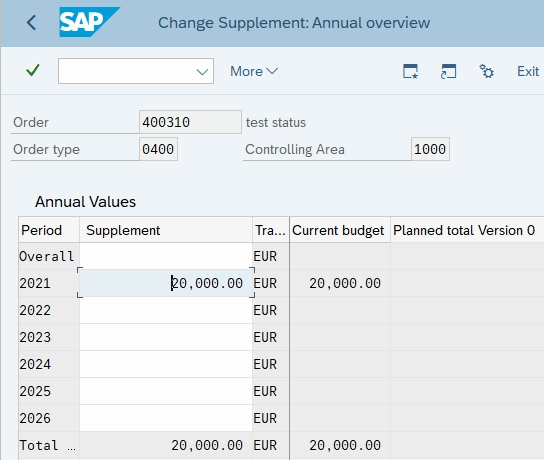
Figure 4 Internal Order Budget Supplement
Check Budget Control Before Use
- Confirm that the correct budget profile is assigned through the order type and that availability control is active.
- Check whether the system uses overall or annual budget, controlling area or object currency, and current or released budget.
- Review included actual costs, commitments, and any exempt cost elements.
- Test the configured warning, mail, and error responses using representative business transactions.
For SAP's explanation of these controls and common configuration issues, see Budget and Availability Control in SAP Help.
SAP Internal Order Budgeting Summary
Use a budget profile and tolerance limits to define how SAP checks internal order spending. Enter the approved original budget with KO22 and record approved supplements with KO24. Monitor actual and committed costs against the appropriate budget, and verify the system response before relying on it to control spending.
Learn More About SAP Controlling
This article is based on Tip #14 from John Jordan's 100 Things You Should Know About Controlling with SAP.
Need Help Controlling Internal Order Spending?
Make approved budgets, availability checks, and reporting work together.
ERPCorp helps organizations optimize SAP internal order budgeting, budget profiles, tolerance limits, and Controlling reporting.
Glossary
Actual Costs
Costs already posted to an internal order. Relevant actual costs are included in availability control according to the configured checks.
Availability Control
A check of assigned costs against budget that triggers configured responses such as warnings, SAP mail, or error messages.
Budget Profile
Settings that control budgeting and availability control, including time horizon, currency, and activation. The budget profile is assigned through the internal order type.
Budget Supplement
An approved addition to an existing budget, entered for an internal order using KO24.
Commitments
Expected future costs arising from transactions such as purchase requisitions and purchase orders. Relevant commitments can consume the available budget before actual costs are posted.
Controlling Area Currency
The currency defined for the controlling area, normally used for internal order availability control unless object currency is selected.
Internal Order
A Controlling object used to plan, collect, monitor, and settle costs for a specific task or purpose.
Object Currency
The currency of an individual Controlling object. A budget profile can specify availability control in this currency.
Original Budget
The initial approved budget before supplements, returns, or transfers. KO22 is used to maintain an internal order original budget.
Tolerance Limits
Configured budget consumption thresholds and associated actions for availability control.