
By Tom King

Let's start with activity type category 1 (manual entry, manual allocation) which is the most common. Activity types defined with this category post directly from a cost center to a receiver cost object.
Look at the definition of activity type CATEG1 as shown at the top in Figure 1. In this case, Actl Acty Type Cat. (Actual Activity Type Category) is blank, which means it is the same as the plan activity type category, or 1 in this example.
2026 editorial note: This tutorial preserves Tom King’s original 2017 example and classic SAP GUI screenshots. Transaction and reporting availability depends on your SAP edition, release, and configuration. For SAP S/4HANA Cloud Public Edition, use the supported apps and processes for your activated scope.
Table of Contents
- Check Category 1 Activity Master Data
- Plan Activity Quantities, Costs, and Prices
- Post Category 1 Activities
- KB21N Example: Sender and Receiver Postings
- More Activity Types
- Glossary
- SAP Documentation
Check Category 1 Activity Master Data

Figure 1 Change Activity Type
Plan Activity Quantities, Costs, and Prices
In this classic example, the planning category is 1. Use KP26 for activity quantities and prices, and KP06 for cost-element planning.
You use KP26 for planning the activity quantity and prices in a cost center for a given period/year.
You use KP06 for assigning costs by cost element to the activity type/cost center combination.
You can also allocate costs to a cost center/activity type from another activity type.
Since the planned price indicator is 1, you can use transaction KSPI to calculate the planned activity price.
Let's look at a simple example of making category 1 activity type postings. 10,000 activity units are planned for Fiscal Year 2017 with KP26 as shown in Figure 2.

Figure 2 Plan Activity Quantity KP26
We've also manually assigned Plan Fixed and Variable Costs to this activity type as shown in Figure 3. The Plan Variable Costs are dependent upon how much activity you plan, while the Plan Fixed Costs are independent of the Plan Activity quantity.

Figure 3 Plan Fixed and Variable Costs by Cost Element with KP06
You can also calculate the plan activity price automatically with transaction KSPI. Because there are fixed and variable costs planned for this activity type/cost center, the activity price will have a fixed portion and a variable portion as shown in Figure 4.

Figure 4 Activity Type Price Planning With KP26
Post Category 1 Activities
Category 1 activities can be allocated directly with KB21N, through cost-relevant production or process-order confirmations such as CO11N or COR6N, or through configured template allocation. Let’s look at KB21N.
You specify the sender cost center, activity type, quantity, and receiving cost object. For production or process-order confirmations, activity quantities depend on the confirmation settings, work center or resource, and routing or recipe data. Cost-relevant confirmed activities credit the supplying cost center and debit the receiving manufacturing object according to the production process.
Work center and activity type assignments connect manufacturing confirmations to cost center allocations.
Templates determine sender activities and receiver consumption using configured functions and formulas. Execute the applicable template-allocation process for the receiver object and SAP release.
KB21N Example: Sender and Receiver Postings
Let's analyze what happens when a posting is made with transaction KB21N. The receiving cost object is a cost center. First we'll look at the Cost Center Actual/Target report S_ALR_87013625 as shown in Figure 5, before posting so that we can set a baseline for the sending and receiving cost centers.

Figure 5 Cost Center Target Actual Report Before Posting
No actual cost has been posted to cost center SND1. The target cost of 25,000.00 in the selected period is for cost element 599999, Depreciation, which was planned as fixed. With no actual activity in this example, the activity-dependent variable target costs are zero.
When you make an actual posting for a category 1 activity type with transaction KB21N, you must enter both the sender cost center and the receiving cost object. In this case, the receiving cost center is RCV1A as shown in Figure 6.

Figure 6 Enter Direct Activity Allocation Transaction KB21N
After you post 100 units of activity type CATEG1 from cost center SND1, the Cost Center Actual/Target/Variance report now shows the information shown in Figure 7.
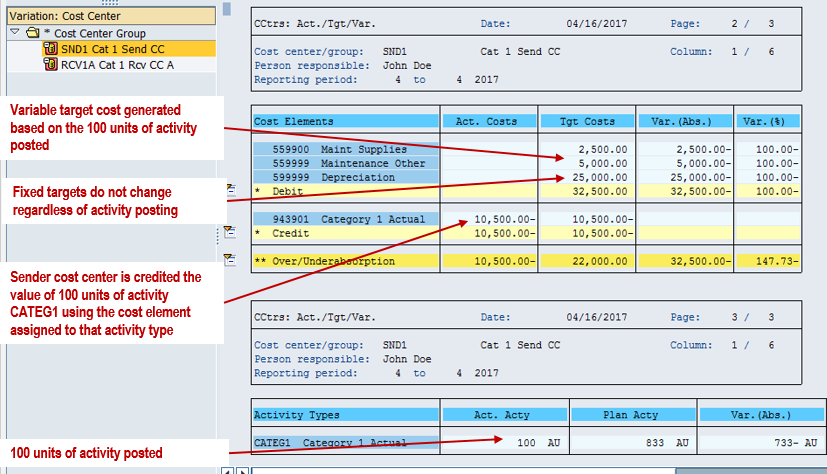
Figure 7 Cost Center Target Actual Report After Posting
After the activity allocation, the report recalculates variable target costs using actual activity relative to planned activity. For the fixed depreciation cost in this example, target costs remain equal to fixed plan costs. These target values support comparison; the actual allocation credits the sender and debits the receiver.
The allocation amount equals activity quantity multiplied by the applicable activity price, divided by the price unit. The posting uses the allocation cost element assigned to the activity type. In SAP S/4HANA, this is a G/L account of type Secondary Costs with cost element category 43 — Internal Activity Allocation.
The offset to the credit posting goes to receiver cost center RCV1A, in this example, as shown in Figure 8.

Figure 8 Cost Center Target Actual Report For Receiver Cost Center RCV1A
The posting is identified using the same cost element 943901 as the credit posting for sender cost center SND1. Although we used a cost center as a receiver, other supported receivers include internal orders, production orders, process orders, product cost collectors, WBS elements, and business processes.
More Activity Types
Continue with the next activity type blog: Category 2 Activity Types: Indirect Determination and Allocation.
Previous: SAP Activity Types: Categories and Prices
Need Help with SAP Activity Allocations?
Trace how activity quantities and prices credit your cost centers and debit the receiving cost objects.
ERPCorp helps teams review activity type settings, planned activity prices, direct allocations, and manufacturing cost reporting in SAP Controlling.
Glossary
Activity Type
A master-data classification of the activities supplied by a cost center, such as machine hours or maintenance hours.
Category 1
An activity type category for manual entry and direct allocation of activity quantities. Cost-relevant confirmations and supported template processes can also generate allocations.
Direct Activity Allocation
Allocation in which the sender cost center, activity type, quantity, and receiver are specified; the quantity is valued using the applicable activity price.
Planned Activity Price
The rate used to value planned activity and, in the classic process, initial actual allocations. Planned price indicator 1 calculates this rate using planned activity.
Price Unit
The number of activity units covered by a price. Allocation value equals quantity multiplied by price, divided by price unit.
Fixed Plan Costs
Planned costs that do not change with the planned activity quantity within the assumptions of the plan.
Variable Plan Costs
Planned costs that vary with activity output. Activity-dependent variable target costs are adjusted to actual activity.
Target Costs
Comparison values calculated by adapting planned costs to actual activity using the applicable target-cost rules. They are distinct from actual allocation postings.
Allocation Cost Element
The account used to credit the sender and debit the receiver. In SAP S/4HANA, internal activity allocation uses a Secondary Costs G/L account with cost element category 43.
Sender and Receiver
The sender cost center supplies the activity and receives a credit. The supported receiving cost object consumes the activity and receives a debit.
SAP Documentation
Learn more about the author on Tom King’s speaker profile.