
By Tanya Duncan

Purchasing info records (PIRs) in SAP provide purchasing prices and conditions that can be used to value externally procured materials during product costing.
In SAP S/4HANA, costing variants and valuation variants determine how material prices are selected when calculating standard cost estimates. By configuring the valuation strategy to use purchasing info records, organizations can incorporate supplier prices and relevant purchasing conditions into material cost estimates.
This approach helps teams explain purchased material costs by separating relevant supplier price conditions, freight, and intercompany markups into appropriate cost components.
In this article, we explain how to configure SAP costing variants and valuation variants to use purchasing info record prices, assign purchasing conditions to cost components, and verify the results in a material cost estimate.
Scope: These screenshots illustrate classic SAP GUI configuration for SAP ERP and applicable SAP S/4HANA systems. Configuration access, supported functions, and navigation depend on your edition and release.
1. Configure the SAP Costing Variant
First, configure the costing variant using Transaction OKKN, as shown in Figure 1.
In this example, I created a custom costing variant for standard cost estimates instead of using the SAP standard costing variant PPC1.
The costing variant controls how material cost estimates are calculated in SAP. It determines key settings, including the costing type, valuation variant, date control, and quantity structure control.
Costing variants are a key component of SAP Product Cost Controlling, determining how material costs are calculated and valuated.
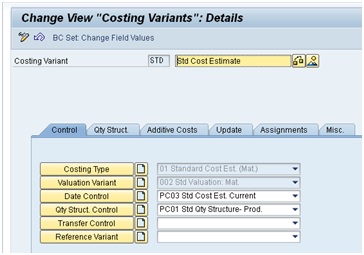
Figure 1: Configure Costing Variant
2. Configure the Valuation Variant for PIR Pricing
The valuation variant defines the sequence of price sources used to value purchased materials and other costing items. It also contains separate strategies for internal activities, subcontracting, and external processing. For materials costed with a valid quantity structure, manufactured assembly costs are normally built from the selected BOM and routing; the purchasing strategy values relevant purchased items rather than automatically replacing the assembly cost.
Open the valuation variant with Transaction OKK4, as shown in Figure 2. Check both general and any plant-specific settings.
SAP material valuation also distinguishes between standard price (S) and moving average price (V). These valuation methods affect how material costs are recorded and can influence the fallback valuation strategy used in product costing. Learn more about standard price versus moving average price.
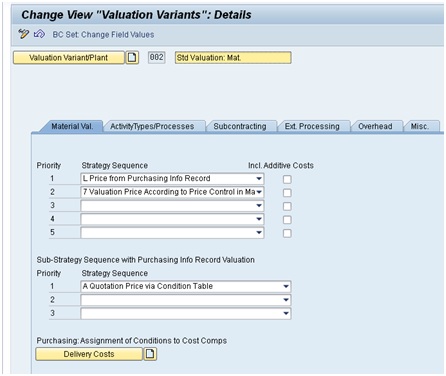
Figure 2: Configure Valuation Variant
The solution to this requirement was to:
- Assign strategy 1 as L Price from Purchasing Info Record
- Sub-strategy A Quotation Price via Condition Table
- Assign purchasing conditions to cost components
In this example, strategy L — Price from Purchasing Info Record is first in the material valuation strategy sequence, with sub-strategy A — Quotation Price via Condition Table. This enables the relevant purchasing conditions to be considered and assigned for the required cost component detail.
If this strategy cannot determine an eligible price, the system searches the next configured source. Here, the second source is 7 — Valuation Price According to Price Control in Material Master: standard price for S or moving average price for V. This is the example's configured fallback, rather than a universal default.
A PIR that exists is not necessarily a usable price source. Verify the relevant purchasing organization, plant applicability, supplier selection, price units, currencies, quantities, and condition validity for the costing valuation date.
3. Assign Purchasing Conditions to Delivery Costs
When you click on the yellow Delivery Costs button in OKK4 valuation variant configuration shown at the bottom of Figure 2, you see a table that allows you to assign purchasing conditions to a valuation variant as shown in Figure 3. You can navigate there with Transaction OKYO. I worked with a purchasing team member to determine which purchasing conditions were relevant for costing and mapped those in the table.
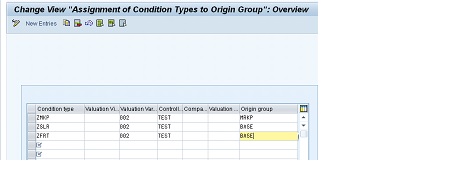
Figure 3: Assign Purchasing Conditions
4. Create Origin Groups for Intercompany Markups
I also created several Origin Groups with Transaction OPKS, as shown in Figure 4, to further separate costs in a cost estimate. For example, we needed to split out the intercompany markup condition ZMKP in a cost estimate. I used Origin Group MRKP to separate this condition from other conditions. ZMKP and MRKP are customer-specific examples, not mandatory SAP standard keys.
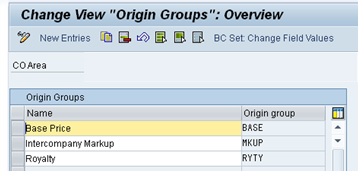
Figure 4: Create Origin Groups
5. Assign Origin Groups to Cost Components
I mapped the origin groups to cost components in the Cost Component Structure with Transaction OKTZ as shown in Figure 5.
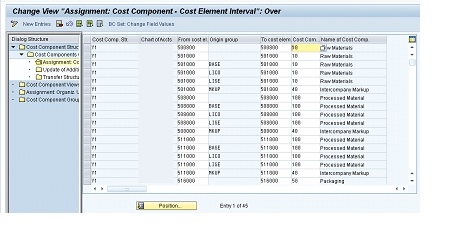
Figure 5: Map Origin Groups to Cost Components
6. Verify Purchasing Info Records and Cost Estimates
Finally, I worked with my purchasing team members to ensure that PIRs and purchasing conditions were created for all externally and intercompany-purchased items.
You display PIRs with Transaction ME13 as shown in Figure 6.
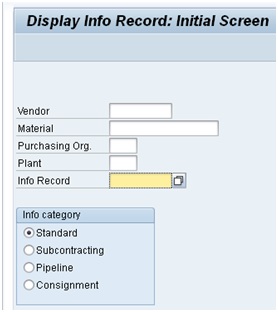
Figure 6 Display Purchasing Info Record Selection
When the valuation variant is configured to use purchasing info record prices, SAP determines the applicable purchasing price based on the valuation strategy, available purchasing information, and relevant conditions. The selected price and delivery costs can then be incorporated into the material cost estimate.
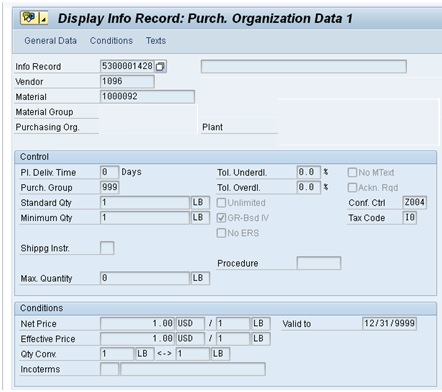
Figure 7 Display Purchasing Info Record
You display purchasing conditions with Transaction MEK3 as shown in Figure 8:
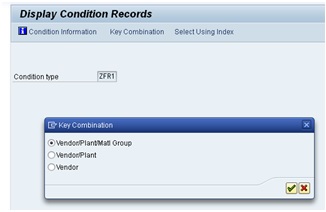
Figure 8 Display Purchasing Conditions
Purchasing conditions can be maintained using different combinations of key fields, depending on the configured access sequence. Figure 9 shows an example of a freight condition record.
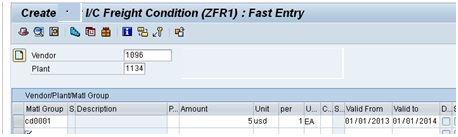
Figure 9 Display Purchasing Conditions
Here is the final result when a cost estimate of a finished good contains purchased items:
In transaction CK11N, create a material cost estimate with quantity structure. Select a purchased component from the costing structure, then open the Valuation tab to review the price selected from the purchasing info record, as shown in Figure 10.
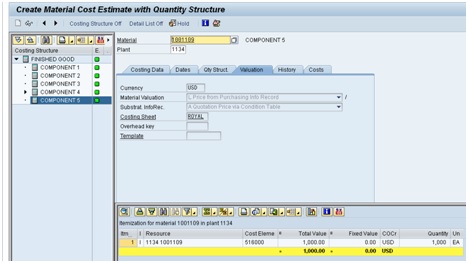
Figure 10 Display Material Cost Estimate
Purchasing info records also support procurement processes beyond standard external purchasing. For related information about procuring materials through external vendors, see our article on SAP subcontracting.
Troubleshoot PIR Pricing and Delivery Costs
A successful costing run still needs a business check. Use a known purchased component and reconcile the selected price and condition amounts before expanding the test to a finished product.
| Symptom | What to Check |
|---|---|
| The estimate uses standard or moving average price. | Confirm the assigned valuation variant, plant-specific settings, strategy sequence, and whether the PIR strategy found an eligible price. |
| The selected supplier price differs from expectations. | Review supplier selection, purchasing organization, plant applicability, valuation date, condition validity, price unit, currency, and relevant scales. |
| Freight or markup is missing from the cost split. | Trace the applicable condition record, PIR sub-strategy, delivery-cost assignment, origin group, and cost component mapping. |
| The total appears overstated. | Check whether freight or another charge is already included in the selected purchasing price and also added through conditions, additive costs, or overhead. |
Validate the result: Match the valuation-tab source to the expected purchasing data, inspect the itemization and cost component split, and compare with an independent calculation using the same quantity, unit, currency, and date. Review warnings and fallback prices before marking or releasing a standard cost estimate.
Intercompany scope: Displaying a markup separately in the cost component split does not itself eliminate intercompany profit. Group valuation and consolidation treatment require their own design and configuration.
SAP documentation: Configuring the Costing Variant; Master Data in Purchasing.
Are Your Purchasing Prices Flowing into Product Costs Correctly?
ERPCorp can help trace PIR price selection, review valuation variants, separate freight and markups, and reconcile cost estimates with your purchasing assumptions.
Glossary
Cost Component
A cost component identifies costs of similar types, such as material, labor, and overhead, by grouping cost elements together in the cost component structure.
Cost Component Structure
Configuration that defines cost components and maps relevant cost elements or G/L accounts and origin groups to them, supporting a breakdown of material costs.
Costing Variant
A costing variant defines how SAP calculates a material cost estimate. It combines settings such as the costing type, valuation variant, date control, and quantity structure control. The assigned valuation variant determines the strategy sequence used to select material prices, including prices from purchasing info records.
Moving Average Price
Moving average price (price control V) is a material valuation method in SAP in which the inventory price is recalculated based on inventory value and quantity. It can change when goods are received or when other relevant inventory valuation transactions occur.
Origin Group
An identifier that adds detail to cost origins. In this scenario, assigning purchasing conditions to origin groups helps map their values to separate cost components together with the relevant cost element or account configuration.
Purchasing Info Record
A purchasing info record (PIR) stores purchasing information for a material and supplier, including prices, purchasing conditions, and procurement details. When the valuation variant is configured accordingly, SAP can use purchasing info record pricing to determine material costs in a standard cost estimate.
Standard Cost Estimate
A standard cost estimate calculates the planned cost of producing or procuring a material. When created with an appropriate costing variant, the estimate can be marked and released to update the standard price in the material master. Standard cost estimates are typically created periodically to support inventory valuation and cost analysis.
Standard Price
Standard price (price control S) is a predetermined price used to value material inventory. It is maintained in the material master and can be updated when a standard cost estimate is released. Differences between the standard price and actual procurement or production costs are recorded as variances or price differences, depending on the transaction and configuration.
Subcontracting
Subcontracting is a procurement process in which a company provides components to an external supplier who performs manufacturing or processing services. The supplier returns the finished or processed material, and SAP tracks the components provided and the subcontracting costs.
Valuation Date
The valuation date determines which material prices and purchasing conditions are applicable when calculating a material cost estimate. For purchasing info records, SAP evaluates the relevant pricing information according to the valuation strategy and applicable validity dates.
Valuation Variant
A valuation variant is a component of a costing variant that defines how SAP selects prices for materials, activity types, subcontracting, and external processing. It specifies valuation strategies and their sequence, including the use of purchasing info record prices for externally procured materials.