
By: Anand Seetharaju CPA, CMA
SAP Margin Analysis (formerly account-based CO-PA) is delivered with a broad set of standard characteristics. However, real-world implementations often require custom characteristics to meet specific reporting and profitability analysis requirements.
SAP S/4HANA provides several extensibility options. For Margin Analysis specifically, two approaches are most relevant:
Option 1: Classic CO-PA custom characteristics using transaction KEA5
Option 2: Custom Fields using the Accounting: Market Segment business context
Choosing the right approach is important because the decision affects reporting, analytics, Fiori applications, cloud compatibility, and future extensibility. This article compares the two approaches and explains when to use each.

Quick Takeaway:
For most new SAP S/4HANA Margin Analysis extensibility requirements, use the Custom Fields app with the Accounting: Market Segment business context. KEA5 remains appropriate for certain specialized requirements and existing characteristics.
Option 1 — Classic CO-PA Custom Characteristics (KEA5)
This is the original mechanism for adding custom characteristics. It is available in SAP S/4HANA On-Premise and Private Cloud, but not in SAP S/4HANA Cloud Public Edition. Characteristics are created directly against the operating concern (up to 60 custom fields, CHAR/NUMC only, 18-character limit). Values can be entered manually in the profitability-segment popup and derived via KEDR. The below diagram shows the classic CO-PA characteristics initial screen.
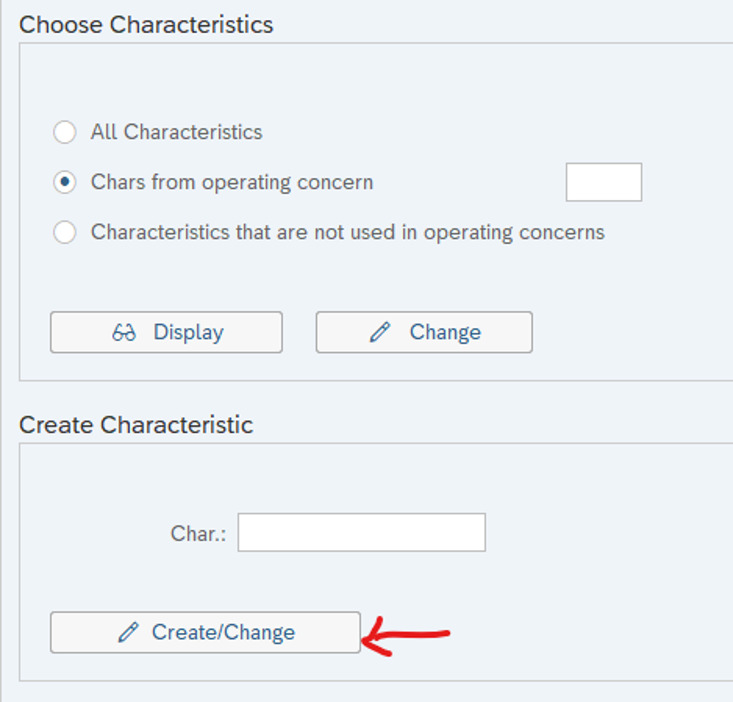
Note: The main drawback of transaction KEA5 is that characteristics are not automatically available in CDS-based analytics or Fiori apps. Each characteristic needs a manual, ABAP-based CDS view extension to surface in modern reporting such as in the app Display Line Items - Margin Analysis (App ID: F4818) or Market Segments – Actual (F0960).
Option 2 — Custom Fields App, “Accounting: Market Segment” Business Context
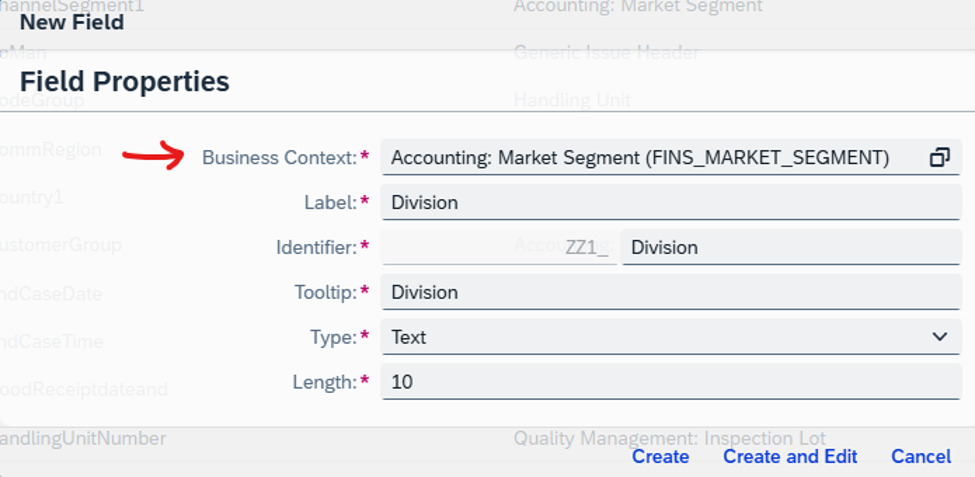
This SAP-recommended path is available in On-Premise and private cloud versions from S/4HANA 2020 and in Cloud Public Edition from its launch. Fields are created no-code via the Custom Fields and Custom Logic apps, or (for fields referencing standard tables) via an append to INCL_EEW_MARKET_SEGMENT_PS published through SCFD_EUI. The limit remains 60 fields in On-Premise and Private Cloud, compared with 200 fields in Public Cloud. These fields are automatically available across CDS analytics, Fiori UIs, and OData/SOAP interfaces. Thus, no manual CDS work is required. Derivation uses KEDR (On-Premise or private cloud) or the Manage Substitution/Validation Rules app (Cloud).
The below pictures show how to create a new custom characteristic using the Market Segment context in Custom fields app.
The table below highlights key differences between the two approaches:
|
Dimension |
KEA5 – Classic CO-PA Characteristics |
Custom Fields App – “Market Segment” Context |
|
Availability |
· On-Premise and Private Cloud in SAP S/4HANA only · NOT in Cloud Public Edition |
· On-Premise and Private Cloud (2020+ onwards); · Cloud Public Edition (from launch) |
|
Field limit |
60 custom fields per operating concern |
· 60 in On-Premise/Private Cloud · 200 (Cloud Public Edition) |
|
Data types |
CHAR / NUMC only; 18 chars max (40 for MATNR-based, Note 3365605) |
· Code List/Text/Numerical Text · Same 18-char limit |
|
Transaction/Fiori app |
Transaction KEA5 (Maintain Characteristics) |
Custom Fields app (app IDF1481); or append to INCL_EEW_MARKET_SEGMENT_PS + SCFD_EUI for standard-table fields (old way) |
|
Derivation |
KEDR derivation tool |
KEDR (On-Premise/Private Cloud) / Manage Substitution & Validation Rules app (Cloud) |
|
CDS analytics / Fiori |
· NOT automatic — requires manual ABAP CDS view extension (EXTEND VIEW in Eclipse) · Refer to SAP 3005736 |
Automatic — available in all relevant CDS-based cubes, queries and Fiori apps |
|
Best suited for |
Compounded characteristics (e.g. region), product hierarchy PAPH[x] fields, predefined partner roles, conversion-exit-based fields especially they were created prior to S4 migration |
Everything else — the default, SAP-recommended choice for extensibility in SAP S/4HANA |
Making Custom Characteristics Available in Reporting
Adding a field to the operating concern is only step one — it must be separately enabled per app, and the method depends on the app's underlying technology:
- BEx-query apps (BPC for S/4HANA, queries prefixed /ERP/SFIN): run FCOM_MET to extend the InfoProvider, then manually add the characteristic as a Free Characteristic in the relevant BEx query (e.g. /ERP/SFIN_V01_Q2501) in BEx Query Designer.
- CDS-query apps (e.g. Market Segment – Actuals, F0943): fields from the Custom Fields app are enabled directly under “Analytics” in that same app; fields created via KEA5 require the manual CDS view enhancement described in Note 3005736.
- Display Line Items – Margin Analysis (F4818): requires directly enhancing CDS query C_JournalEntryItemBrowser.
Recommendations
- SAP recommends to default to the Market Segment business context (using the Custom Fields app) for any new Margin Analysis extensibility need — it is the only option supported in Cloud, needs no custom ABAP for analytics, and is SAP's stated forward direction.
- Reserve KEA5 for the narrow cases it alone handles — compounded characteristics (e.g. region), product hierarchy (PAPH[x]), predefined partner roles, and conversion-exit-based fields — and requires manual CDS view work if these need to reach Fiori/CDS reporting, especially post S4 migration.
- Never migrate an existing KEA5 characteristic into the Custom Fields app. SAP explicitly warns this causes data loss and can render the operating concern unusable. Refer to the SAP Notes below.
- Respect the hard restrictions, especially the uppercase-only rule for CODELIST values: releasing a lowercase code on a field already assigned to an operating concern deactivates that operating concern immediately, recoverable only by marking the entry obsolete.
- Plan deletions carefully. Cleanly removing a custom field means checking SCFD_FIELDVIEWER's “Where Used” list, manually clearing references in KOMPAKE/KOMKAKE, refreshing generated program object lists, and removing outdated derivation tables (K9R*) via program RKEDRCLEAN — it is not a single-step delete.
Reference SAP Notes: SAP KBA 3095004, 3005736, and 2453614.
Need Help With SAP Margin Analysis?
ERPCorp helps organizations optimize SAP Margin Analysis, Finance & Controlling, Product Costing, and S/4HANA to improve cost transparency, profitability reporting, and financial processes.
Explore SAP Consulting Services
About Anand Seetharaju
Anand is a CPA and CMA with 25+ years of experience in financial, management, and tax accounting. He holds SAP certifications in Finance and Tax, with specialized expertise in Revenue Accounting, Margin Analysis, indirect taxation and global tax compliance.
A longtime contributor to the SAP Controlling community, Anand is a returning and often-requested speaker at our annual SAP Controlling Conference.