
By John Jordan
SAP variance split in S/4HANA assigns production variance categories to separate general ledger accounts. It helps you distinguish input price, input quantity, and other manufacturing variances in Financial Accounting and Margin Analysis.
In this article, I explain how the splitting profile connects variance categories to G/L accounts, which configuration fields you need to maintain, and how to check the results after settlement.
The configuration described here follows the classic period-end settlement approach in SAP S/4HANA covered in Product Cost Controlling with SAP S/4HANA, the book I co-authored with Janet Salmon. Event-based production accounting uses a different processing approach and is outside this article’s scope.
Table of Contents
- What Is SAP Variance Split?
- How Variance Split Works
- Configure the Variance Split
- Test the Results After Settlement
- Variance Split and Margin Analysis
- Variance Split and COGS Split
- Common Configuration Issues
- Learn More
- Glossary
What Is SAP Variance Split?
SAP variance split assigns production variance categories to separate G/L accounts through a price difference splitting profile. For example, input price variance and input quantity variance can post to different accounts when a production order is settled.
Variance calculation determines the amounts in each category. The splitting profile determines which accounts receive those amounts during settlement. Keeping these steps clear helps you identify whether a reporting issue originates in the variance calculation or in the account mapping.
You can also distinguish the source of a variance by specifying individual cost elements, cost element ranges, or cost element groups. This allows the account assignment to reflect both the variance category and the costs that produced it.
How Variance Split Works
Consider a simplified production order with actual costs of $10,800 and target costs of $10,000. Assume there is no work in process or scrap adjustment affecting this example. Variance calculation identifies an unfavorable variance of $800, analyzed as shown in Table 1:
| Variance category | Unfavorable variance | Illustrative target G/L account |
|---|---|---|
| Input price variance | $300 | Input Price Variance |
| Input quantity variance | $400 | Input Quantity Variance |
| Remaining input variance | $100 | Remaining Input Variance |
| Total | $800 |
Table 1: Example Production Variance Split
The splitting profile maps each category to its target account. During settlement, SAP uses those assignments to make the category detail available in accounting and Margin Analysis.
The $800 remains the total variance. Splitting it into categories provides more detail about the difference; it does not create an additional $800 expense.
This numerical example illustrates the principle and is not a reproduction of an example from the book.
Configure the Variance Split
Before You Configure
Agree on the reporting detail you need before building the splitting profile. Check that:
- The production order has calculated variances for the categories you want to report.
- The source cost elements or cost element groups and target G/L accounts are identified.
- The profile, company code assignment, and validity date apply to the posting period you will test.
Test the configuration with a representative order through settlement and accounting reconciliation.
Create the Target G/L Accounts
Create the G/L accounts required for your variance reporting. In the configuration described in the book, the target accounts use cost element category 1 — Primary Costs/Cost-Reducing Revenues.
Choose account descriptions that explain the variance clearly. For example, an account named Input Quantity Variance is easier to interpret in a report than a generic account named Production Differences.
Decide how much detail your reporting needs before creating accounts. You may want separate reporting for material quantity variances and activity quantity variances, using different source cost element groups in the mapping.
Define the Splitting Profile
In SPRO, follow this IMG menu path:
Financial Accounting > General Ledger Accounting > Periodic Processing > Integration > Materials Management > Define Accounts for Splitting Price Differences
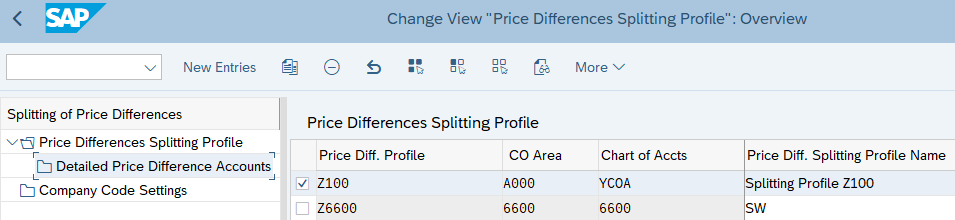
Create or select a price difference splitting profile, as shown in Figure 1. The book uses profile Z100 as an example; use the profile appropriate for your configuration.
Assign Variance Categories to Target Accounts
Select the splitting profile, open Detailed Price Difference Accounts, and choose New Entries.
Maintain the fields described in Table 2 and illustrated in Figure 2:
| Field | What you maintain |
|---|---|
| Scheme Line | An identifier for the mapping line, such as 0001. |
| Description | A meaningful description, usually the variance category name. |
| Cost Elem. From and Cost Elem. To | A single source cost element or a source cost element range. |
| CElem Group | A source cost element group, as an alternative to specifying individual elements or a range. |
| Category | The variance category to be assigned, such as input quantity variance. |
| Target Account | The G/L account that receives the mapped variance during settlement. |
| Default Ind. | The indicator identifying the fallback account for amounts that cannot be assigned through the detailed mapping. |
Table 2: Variance Split Configuration Fields
Add the scheme lines required for the variance categories and source costs you want to report. Save the configuration.
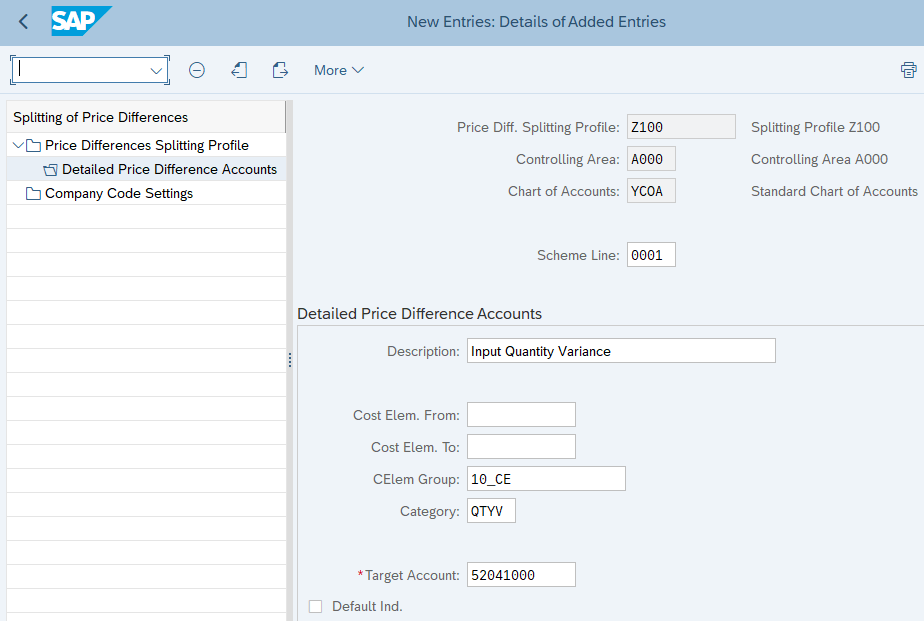
The example in Figure 2 uses controlling area A000, chart of accounts YCOA, and scheme line 0001. The Default Ind. is not selected on this line; select it on the line intended to receive rounding differences and unmapped amounts.
Maintain the Default Account
Set the Default Ind. for one target account in the profile. The default receives rounding differences and amounts for which no specific target account is defined for the source cost element and variance category combination.
Review postings to this account during testing. An unexpectedly large balance may indicate that the detailed mappings do not cover all relevant source costs or categories.
Check Company Code Settings
Before testing, verify that the intended splitting profile is assigned to the relevant company code in Company Code Settings, with the appropriate validity date. A completed mapping must also be applicable to the company code and posting period being tested.
Test the Results After Settlement
Use a representative production order with calculated variances. For the classic settlement approach described here:
- Complete the applicable period-end cost processing, including overhead and WIP processing where required.
- Run variance calculation in update mode and review the variance categories. The book explains that target cost version 0 provides the total variance relevant for settlement.
- Run settlement for the order.
- Inspect the resulting accounting documents and the target G/L accounts.
- Compare the category amounts with the variance calculation results, allowing for rounding and any amounts assigned to the default account.
- Check the relevant Margin Analysis report and profitability characteristics.
Variance calculation alone does not create the settlement postings. If the calculation contains category detail but the accounting report does not, check that settlement has completed and that the profile and account assignments apply to the order being tested.
For more background on variance calculation and period-end processing, see the ERPCorp Production Variance Analysis in SAP S/4HANA article.
Variance Split and Margin Analysis
Revenue and standard cost of goods sold provide a starting point for analyzing product profitability. Production variances provide additional information about manufacturing performance and its effect on margins.
Separate variance accounts help you see whether a variance relates to input prices, quantities consumed, or other categories. Where the appropriate profitability characteristics are available, you can analyze the posted amounts by market segment.
The account mapping provides the financial detail. Investigating its cause still requires analysis of the production order, material consumption, activity confirmations, and the underlying cost estimates.
If you need additional reporting dimensions, see SAP Margin Analysis Extensibility: KEA5 vs Custom Fields. Account splitting and reporting characteristics address different parts of the profitability analysis design.
Variance Split and COGS Split
Variance split and cost of goods sold split provide different views of manufacturing costs, as shown in Table 3:
| Feature | Variance split | COGS split |
|---|---|---|
| What it breaks down | Production variances | Cost of goods sold |
| Basis for the breakdown | Source cost elements and variance categories | Cost components from the cost estimate |
| Example detail | Input price variance and input quantity variance | Material, labor, and overhead |
| Reporting purpose | Explain differences from the manufacturing cost baseline | Show the composition of COGS |
Table 3: Variance Split and COGS Split Comparison
Together, these views help explain the planned cost composition and the manufacturing differences that affect profitability. For the cost-component approach, see SAP’s documentation on splitting the cost of goods sold.
Common Configuration Issues
If the variance split results do not match your expectations, check the following common configuration issues:
- Most amounts post to the default account. Compare the source cost elements and variance categories in the calculation with the profile’s mappings. Confirm that the intended cost element groups contain the relevant elements.
- The variance categories are missing before settlement. Review the variance calculation and its configuration first. The splitting profile maps the calculated results; it does not calculate the categories.
- The expected G/L accounts contain no postings. Check settlement completion, company code assignment, validity date, and target account settings.
- The totals look duplicated in a report. Review the journal entries and report selection to understand the total and category postings, including their offsets. Do not add every displayed line as though each were a separate expense.
Learn More
For detailed configuration and reporting examples, see Product Cost Controlling with SAP S/4HANA by John Jordan and Janet Salmon:
- Section 15.1.1, Variance Split, pages 471–472
- Section 20.3.1, Variance Split, pages 591–592
Improve Your Production Variance Reporting
Are production variances difficult to explain in your financial reports?
ERPCorp can help you review variance calculation, settlement configuration, and Margin Analysis reporting so your finance team can identify and investigate manufacturing cost differences.
Glossary
Variance Split
The assignment of production variance categories and source cost elements to target G/L accounts using a price difference splitting profile.
Splitting Profile
A configuration object containing the account mapping rules used to split price differences by variance category.
Variance Category
A classification of a manufacturing cost difference, such as input price variance or input quantity variance.
Target Account
The G/L account assigned to receive an amount through a variance split mapping.
Default Account
The account marked with the default indicator to receive rounding differences and amounts not covered by a specific mapping.
Margin Analysis
SAP’s account-based profitability analysis, which uses G/L account information to analyze profitability by market segment.
COGS Split
The breakdown of cost of goods sold into separate accounts using the cost component information from a cost estimate.