
By Tom King

SAP category 2 activity types can calculate sender quantities from activity already posted in receiver cost centers. In this example, machine hours drive the quantity of support activity allocated from cost center SND2, using indirect activity allocation rather than a separate manual sender posting.
Learn how to plan the relationship, configure receiver tracing factors and weighting factors, execute the cycle with KSC5, and revalue the allocation at an actual activity rate.
Example scope: The screenshots use fiscal year 2017 and classic SAP GUI transactions. The workflow is relevant to SAP ERP and applicable SAP S/4HANA on-premise or Private Edition systems. Check the available apps and configuration for your edition and release.
How Receiver Activity Drives Category 2 Allocation
In the first category 2 example, a manually posted statistical key figure provided the receiver tracing factor. Here, existing MACHHR activity postings provide that basis, removing the need for a separate statistical key figure posting.
MACHHR is a category 1 activity type. A manufacturing company uses it to allocate conversion costs from production cost centers to production orders. With the appropriate work center, routing, formula, and confirmation settings, production confirmations such as CO11N generate the activity quantities and allocations.
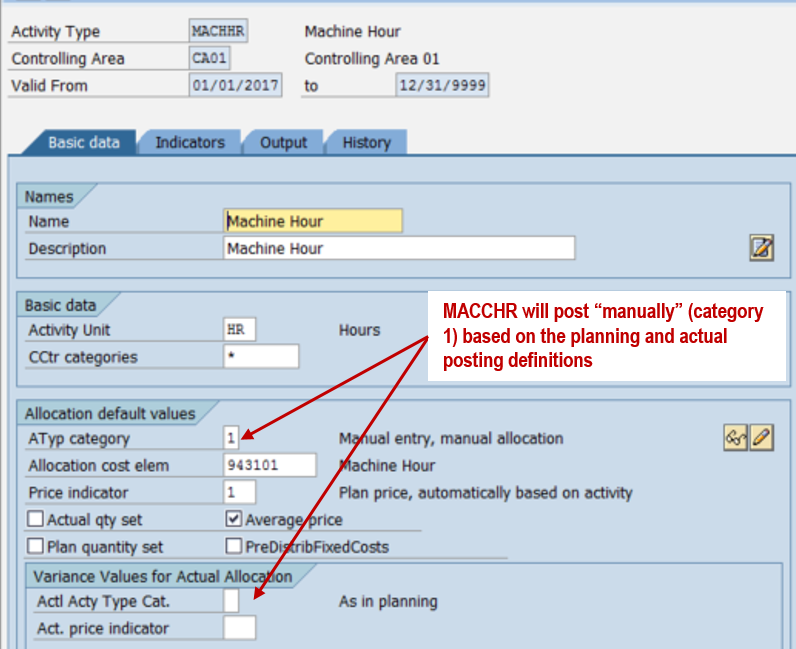
The support activity CATEG2 is different: the cycle calculates its sender quantity inversely from each receiver's actual machine hours. For this example:
Receiver CATEG2 quantity = actual receiver MACHHR × planned CATEG2 units per machine hour.
Sender CATEG2 output = sum of the calculated receiver quantities. No separate manual posting of that sender output is required for this inverse calculation.
Plan the Machine-Hour and Support Relationship
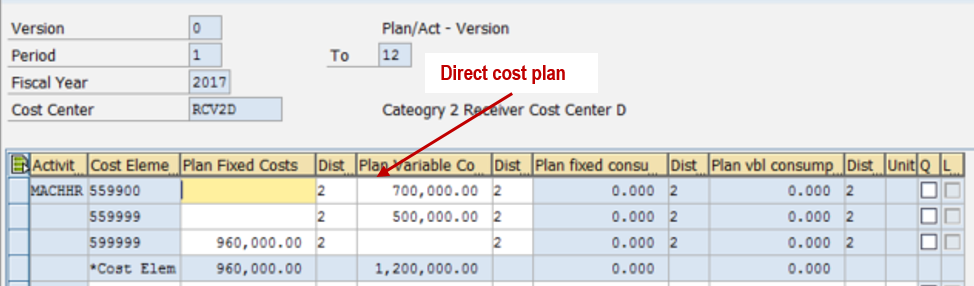
The MACHHR prices in RCV2D, RCV2E, and RCV2F include directly planned manufacturing costs and planned support activity received from SND2/CATEG2. Figure 2 shows RCV2D's annual plan of 8,000 machine hours in KP26.
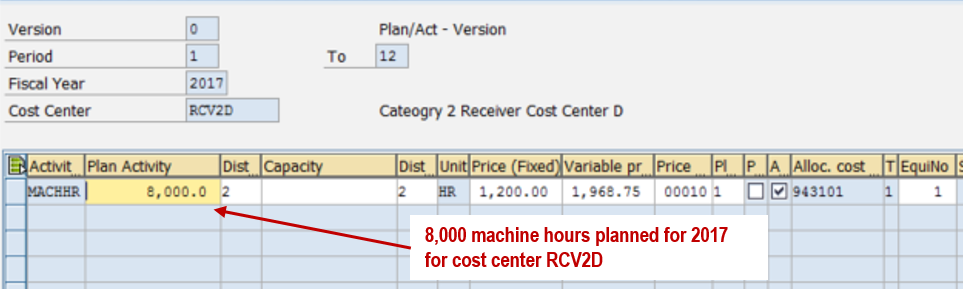
Use KP06 layout 1-101 for direct cost planning and layout 1-102 for activity input planning, as illustrated below.
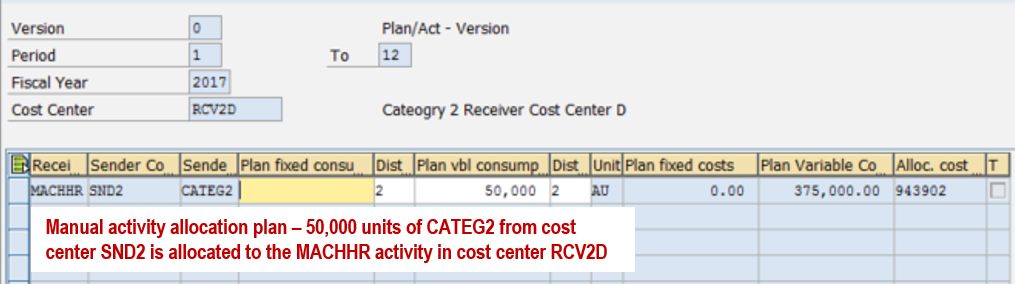
| Receiver cost center | Annual MACHHR plan (HR) | Annual CATEG2 input (units) | CATEG2 units per MACHHR |
|---|---|---|---|
| RCV2D | 8,000 | 50,000 | 6.25 |
| RCV2E | 16,000 | 30,000 | 1.875 |
| RCV2F | 24,000 | 40,000 | 1.666667 (rounded) |
| Total | 48,000 | 120,000 | Receiver-specific ratios |
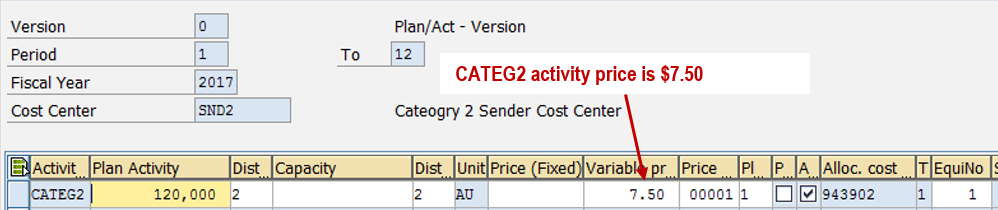
The planned CATEG2 inputs total 120,000 units, matching SND2's annual output plan. Thus the sender's planned output is fully allocated in this example. The planned CATEG2 price is 7.50 per unit.
Configure the Indirect Activity Allocation Cycle
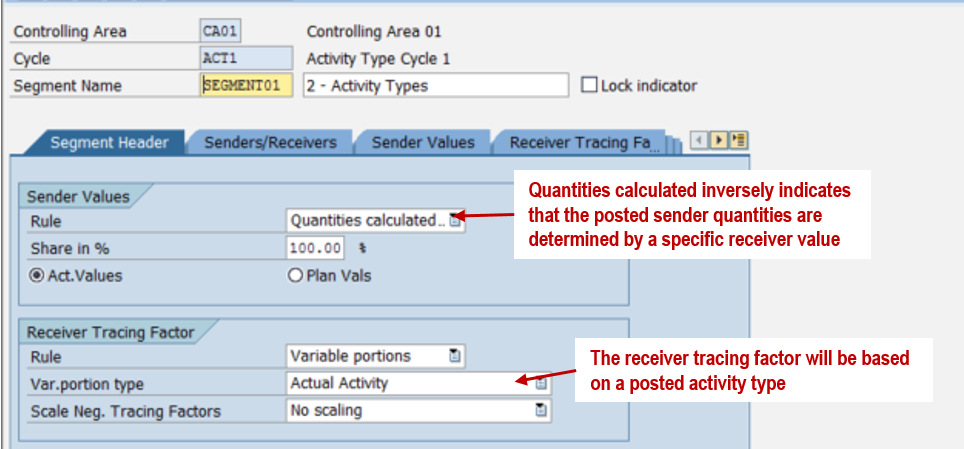
Create the actual indirect activity allocation cycle with KSC1; execute it with KSC5. Cycle ACT1 contains one segment. Set the sender rule to quantities calculated inversely and the receiver rule to variable portions based on actual activity.
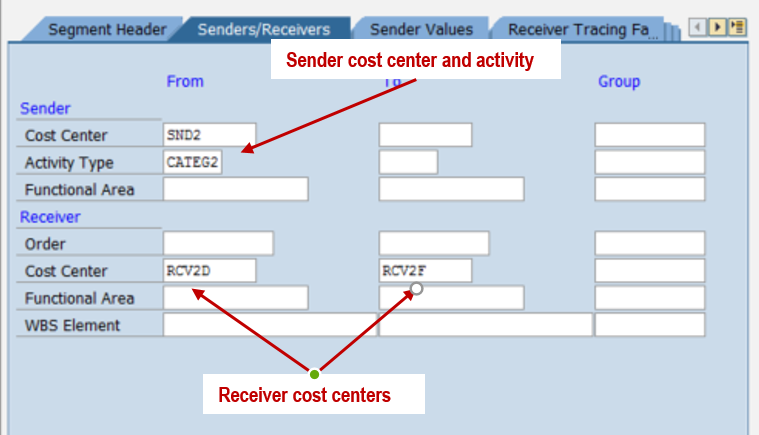
On the Senders/Receivers tab, identify sender SND2, activity type CATEG2, and receiving cost centers RCV2D through RCV2F.
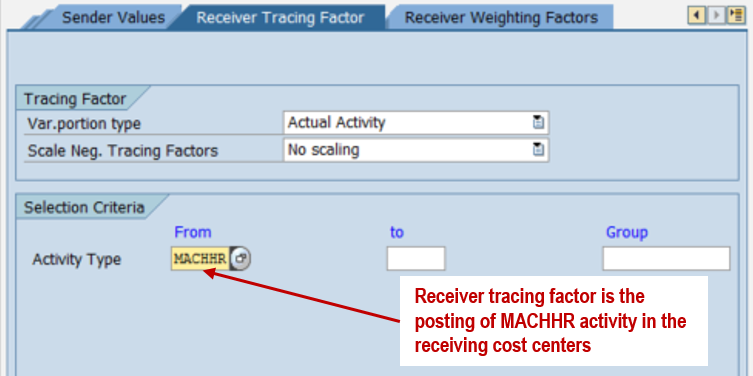
On the Receiver Tracing Factor tab, select actual activity MACHHR. The cycle reads each receiver's posted machine hours.
Translate the Planned Ratios into Weighting Factors
Divide each receiver's planned CATEG2 input by its planned MACHHR output. The resulting ratios are 6.25, 1.875, and approximately 1.666667. In the illustrated screen, enter integer weighting factors and use Factor per 1,000,000 to retain decimal precision.
| Receiver | Weighting factor | Factor per | Effective ratio |
|---|---|---|---|
| RCV2D | 6,250,000 | 1,000,000 | 6.25 |
| RCV2E | 1,875,000 | 1,000,000 | 1.875 |
| RCV2F | 1,666,667 | 1,000,000 | 1.666667 |
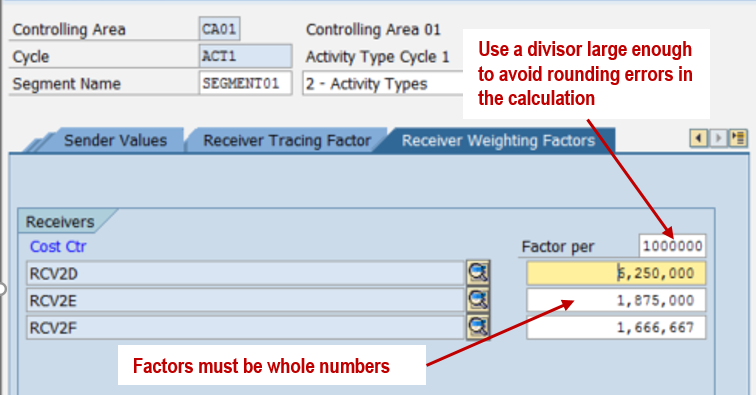
The large divisor reduces rounding effects; it does not remove them entirely. RCV2F's exact planned ratio is 5/3, which cannot be represented exactly with six decimal places.
Run KSC5 and Check the Results
Review Receiver Activity Before Allocation
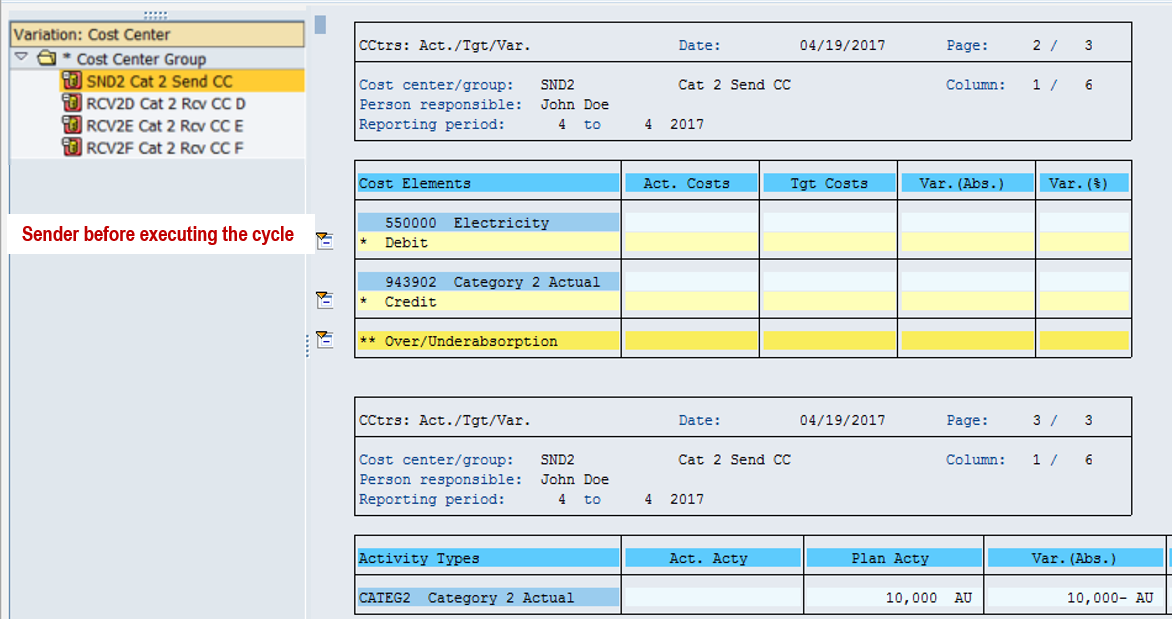
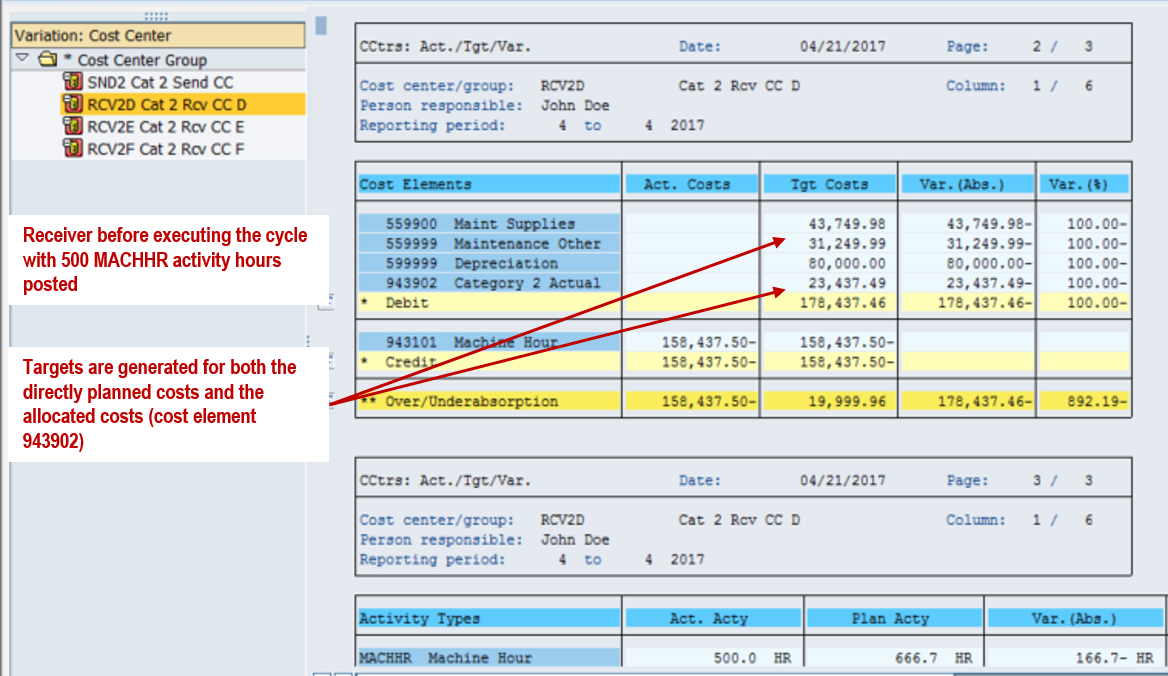
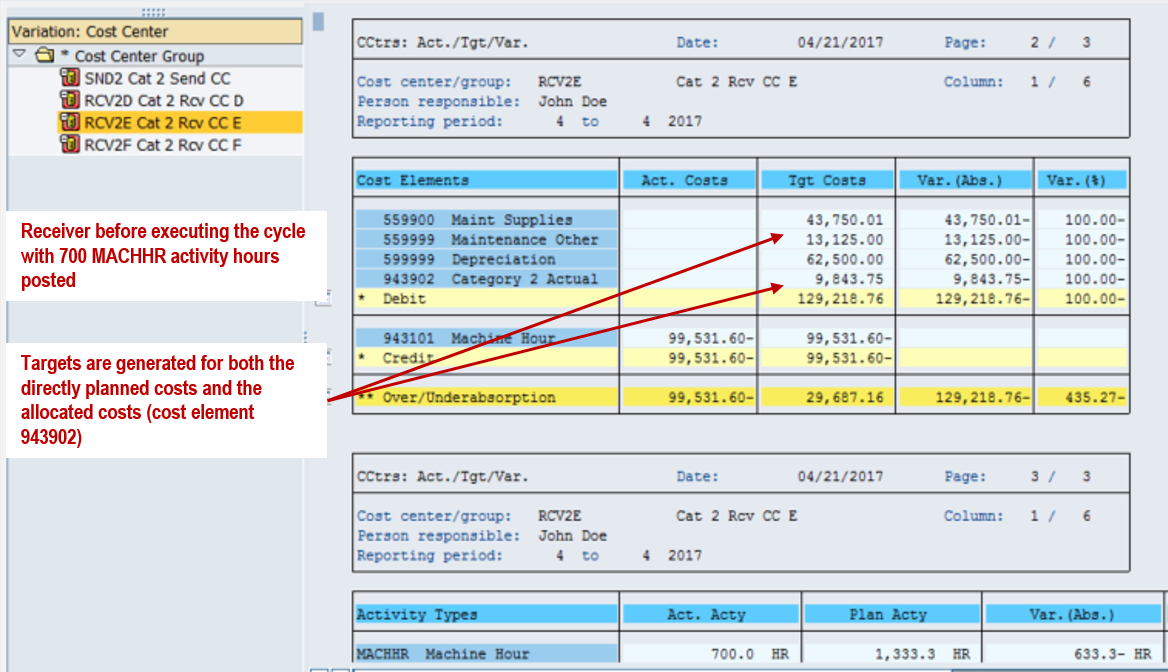
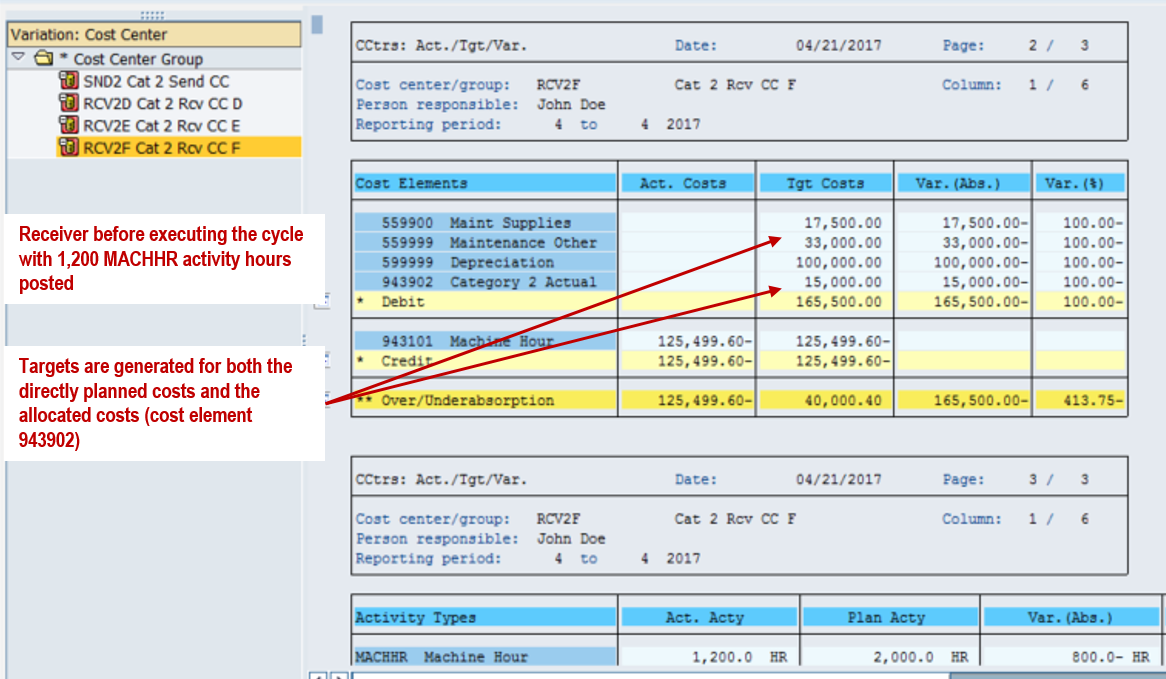
In period 4, the receivers have posted 500, 700, and 1,200 machine hours. Before ACT1 runs, SND2 has no actual CATEG2 output or associated variable target costs. The receiver reports already show target support costs based on their activity and planning relationships; those targets are not actual CATEG2 debits.
Execute ACT1 for Period 4
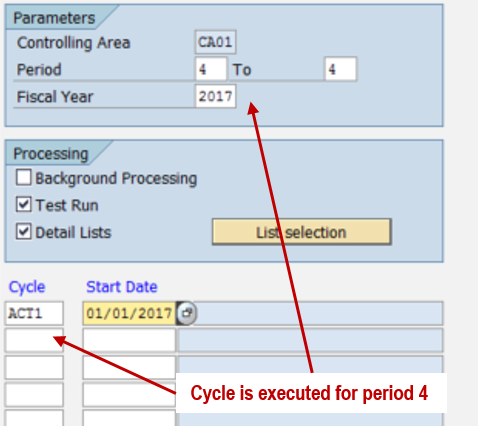
In KSC5, select cycle ACT1, period 4, and fiscal year 2017. First review a test run, as selected in Figure 14. Resolve any messages, then execute an update run to create the actual allocation postings.
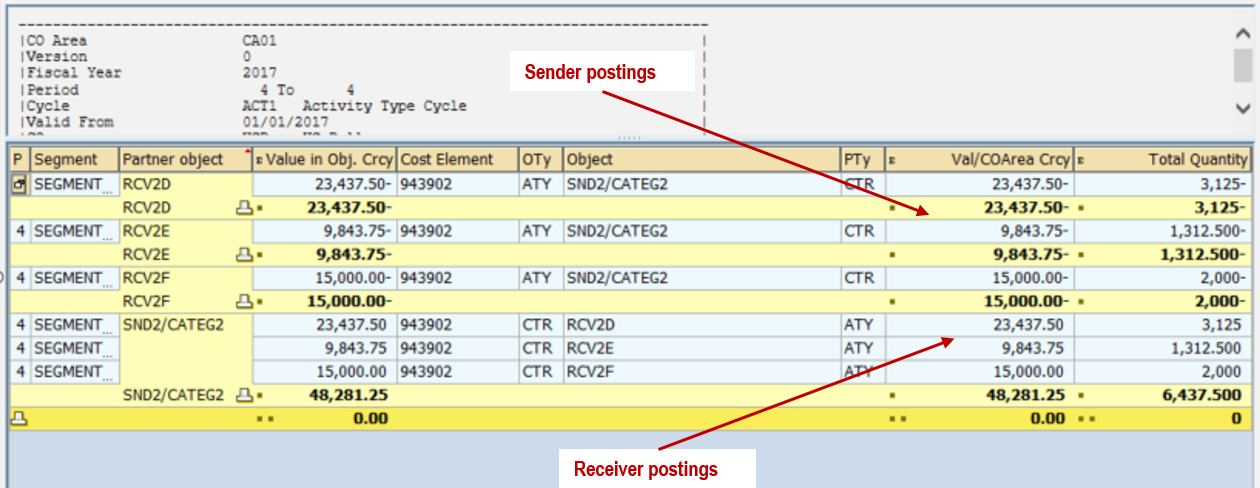
| Receiver | Actual MACHHR (HR) | CATEG2 calculation | CATEG2 units shown | Value at 7.50/unit |
|---|---|---|---|---|
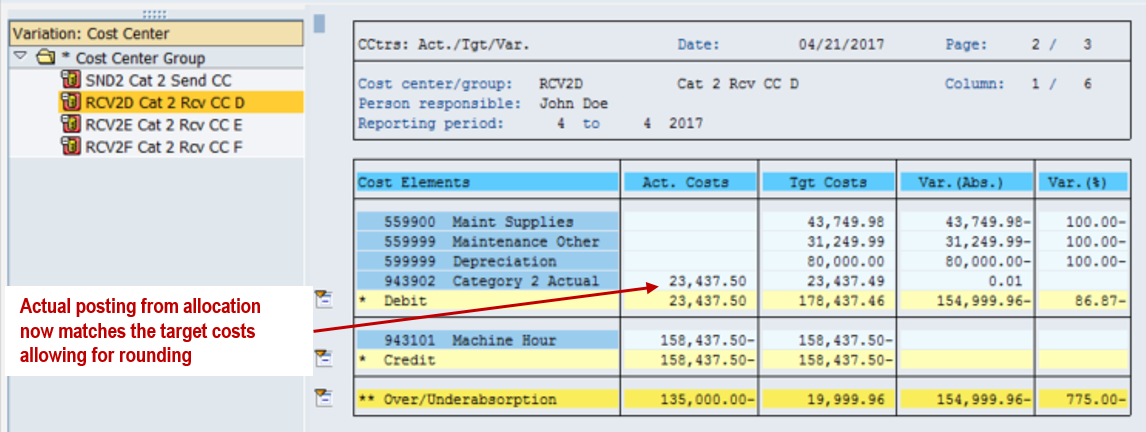
| RCV2D | 500 | 500 × 6.25 | 3,125.000 | 23,437.50 |
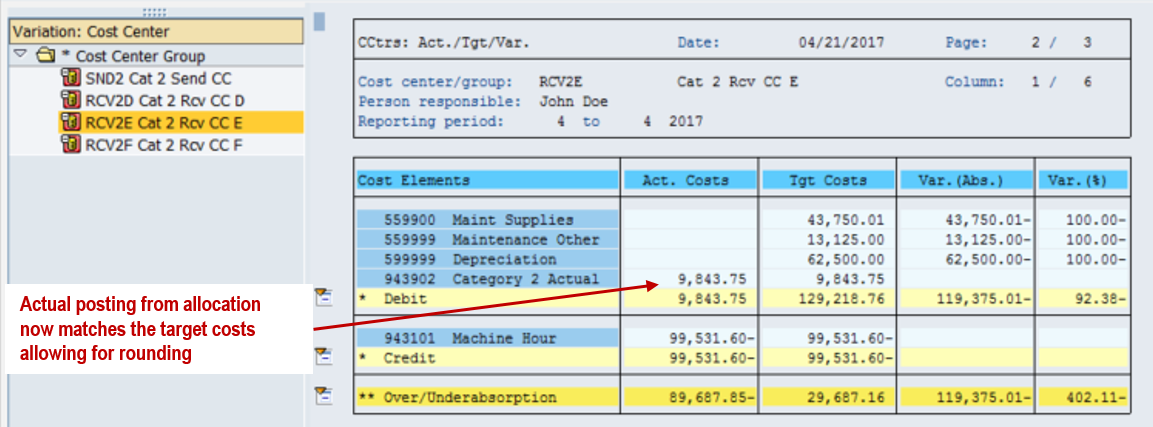
| RCV2E | 700 | 700 × 1.875 | 1,312.500 | 9,843.75 |
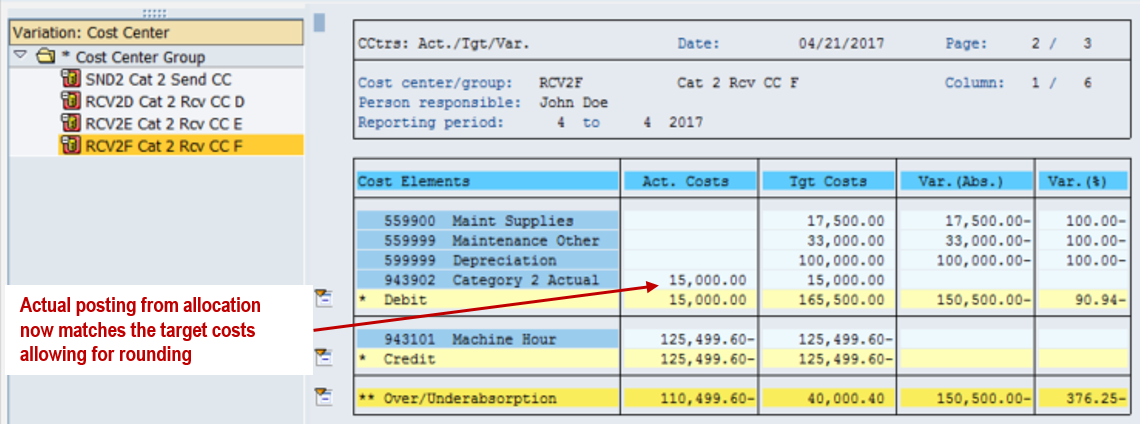
| RCV2F | 1,200 | 1,200 × 1.666667 | 2,000.000 | 15,000.00 |
| Total | 2,400 | Sum of receiver quantities | 6,437.500 | 48,281.25 |
Figures and values are displayed at the precision used in the cycle report. Small differences can arise from quantity, price, and currency rounding.
Reconcile Sender and Receiver Postings
The update run credits SND2 and debits the receivers using allocation cost element 943902. These are actual allocations valued initially at the planned activity price. They do not change the plan data.
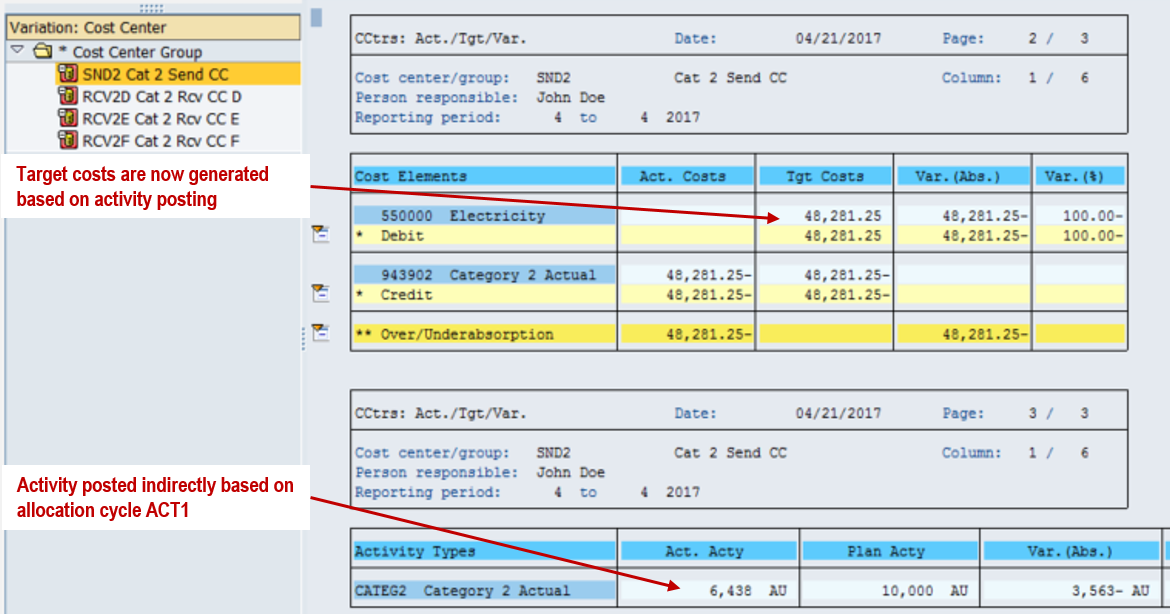
In this example, receiver actual CATEG2 costs match the related target costs apart from rounding because the cycle weights were deliberately aligned with the planned consumption ratios. This match is a feature of the example, not a general guarantee for every allocation cycle.
Calculate Actual Prices and Revalue the Allocation
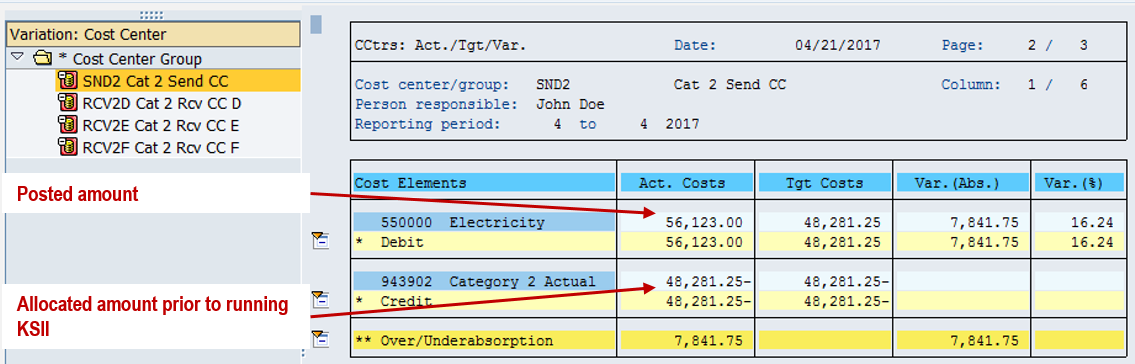
Initial valuation at the planned price can leave actual cost variances on SND2. CATEG2 has actual price indicator 5, allowing automatic actual price calculation based on activity.

The example then posts 56,123.00 to SND2 under cost element 550000, Electricity. The initial allocation credit remains 48,281.25, leaving 7,841.75 underabsorbed before actual-price revaluation.
Run actual price calculation with KSII. Revaluation of the activity relationships between cost centers also depends on the relevant version and fiscal-year configuration; actual price indicator 5 alone does not ensure that revaluation postings occur. Check the calculation and revaluation settings and review the run results.
Figure 22 shows SND2 after actual-price revaluation. The actual allocation credit increases to 56,123.03, leaving a rounding residual of 0.03. It is a sender report. Where revaluation is active, the corresponding price differences are reflected in the receiving cost centers.
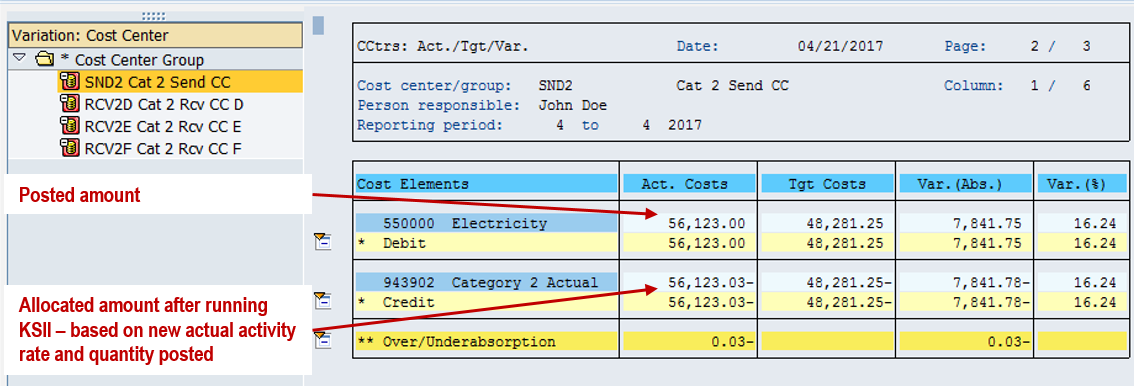
Before closing, reconcile sender credits to receiver debits, compare allocated quantities with the cycle report, and distinguish operational cost variances from rounding residuals.
Continue the Activity Type Posting Series
- Previous: Category 2 allocation using a statistical key figure
- Next: Category 3 manual entry and indirect allocation
- Activity type posting series recap
Need Help with SAP Activity Allocation?
Review your sender and receiver relationships, tracing factors, activity rates, and period-end reconciliation with ERPCorp's SAP Controlling consultants.
Glossary
Category 2 Activity Type
An activity type with indirect entry and indirect allocation. For the inverse calculation shown here, receiver tracing factors and weighting factors determine the sender quantity.
Indirect Activity Allocation
A cycle-based process that allocates activity quantities and the associated costs using sender and receiver rules.
Tracing Factor
The receiver value used as an allocation basis. Here it is the actual MACHHR activity quantity posted in each receiving cost center.
Weighting Factor
A factor applied to a receiver's tracing value. Here it expresses planned CATEG2 consumption per machine hour; Factor per scales the integer entered in the cycle.
Activity Rate
The price per unit used to value an activity allocation. This example initially uses the planned CATEG2 price of 7.50 per unit and later calculates an actual price with KSII.
Target Costs
Planned costs adjusted to the actual activity level under the relevant planning relationships. Target costs provide a comparison basis and do not by themselves represent actual allocation postings.
SAP documentation: Senders and Receivers for Indirect Activity Allocation; Customizing for Calculation of Actual Prices.
Product Cost Controlling with SAP S/4HANA
Ready to implement product cost controlling in SAP S/4HANA? Walk through the master data setup and cost estimate configuration, click by click. Get new insight into the most recent SAP Fiori apps, event-based processing and real-time accounting, and the future direction of Universal Parallel Accounting UPA with SAP S/4HANA.
Production Variance Analysis in SAP S/4HANA
Guesswork and projections aren’t enough to plan production costs effectively. This guide to production variance analysis in SAP S/4HANA will help you optimize your production processes and increase profitability.
Product Cost Controlling with SAP
Looking for a comprehensive guide to product costing in SAP (SAP CO-PC)? With this bestseller, you’ll begin with a breakdown of how to manage master data and configure settings in SAP CO.
Controlling with SAP
“110 Things” that unlock the secrets of working with the Controlling component in SAP! Get ready to add to your CO arsenal and replace some cumbersome techniques you’ve used for cost object controlling, profit center accounting, profitability analysis, and more.