
By Tom King

SAP activity type category 3 combines manual quantity entry with indirect activity allocation. You record the sender's actual activity with KB51N, then run KSC5 to distribute that quantity using the cycle's sender/receiver relationships and tracing factors.
This worked example allocates 8,500 units of CATEG3 from cost center SND3 to three receiver cost centers. It shows how weighted receiver machine hours determine each receiver's share while the total sender quantity remains the amount manually posted.
Editorial update: The example and screenshots originate from the 2017 tutorial and illustrate classic ECC and applicable SAP S/4HANA on-premise or Private Edition processes. Check supported transactions, categories, and allocation processes for your edition and release, particularly SAP S/4HANA Cloud Public Edition.
In This Article
Check Category 3 Master Data
Category 3 is useful when the sender output quantity is known, but receiver consumption should be distributed using allocation rules. Unlike the category 2 example, the cycle does not determine a new total sender quantity from receiver activity.
The CATEG3 master record below uses planning category 1 and actual category 3. These are separate settings. The assigned allocation cost element is 943903.
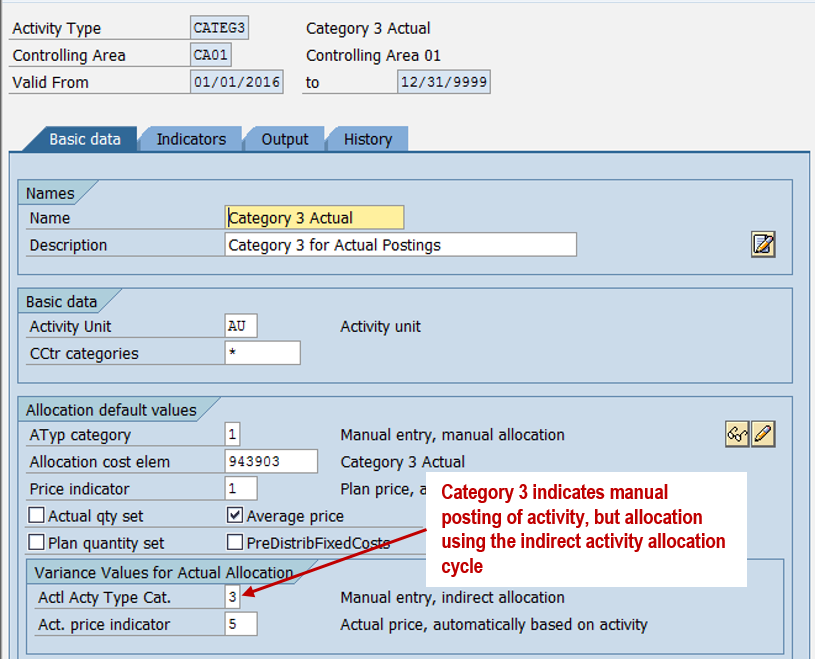
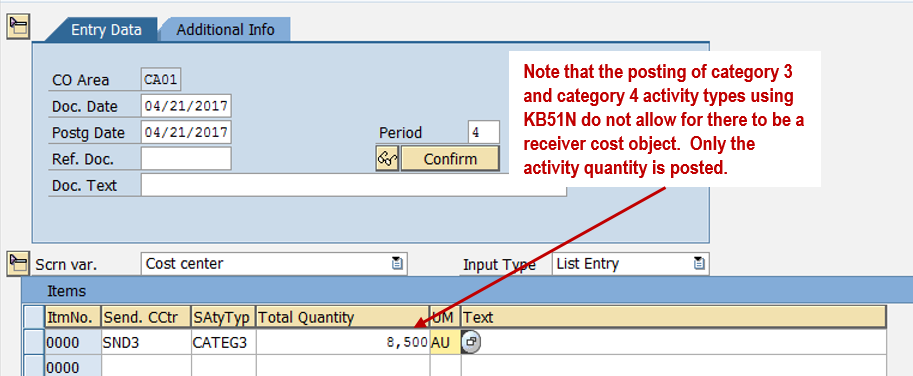
KB51N records the activity on SND3 without a receiving cost object. The subsequent indirect allocation creates the sender credit and receiver debits.
Plan Sender and Receiver Activities
The annual plan contains 120,000 CATEG3 units and $900,000 of costs for sender SND3. Planned receiver MACHHR output and CATEG3 input establish the consumption relationships below. These are annual planning totals, not the April actual quantities.
| Receiver | Planned MACHHR (Hours) | Planned CATEG3 (Units) | CATEG3 per MACHHR |
|---|---|---|---|
| RCV3A | 8,000 | 50,000 | 6.25 |
| RCV3B | 16,000 | 30,000 | 1.875 |
| RCV3C | 24,000 | 40,000 | 1.666667 (rounded) |
| Total | 48,000 | 120,000 | — |
For RCV3A, 50,000 divided by 8,000 gives 6.25 CATEG3 units per planned machine hour. The ratios become receiver weighting factors for the actual allocation.
Configure the Indirect Activity Allocation Cycle
Select Posted Quantities as the Sender Rule
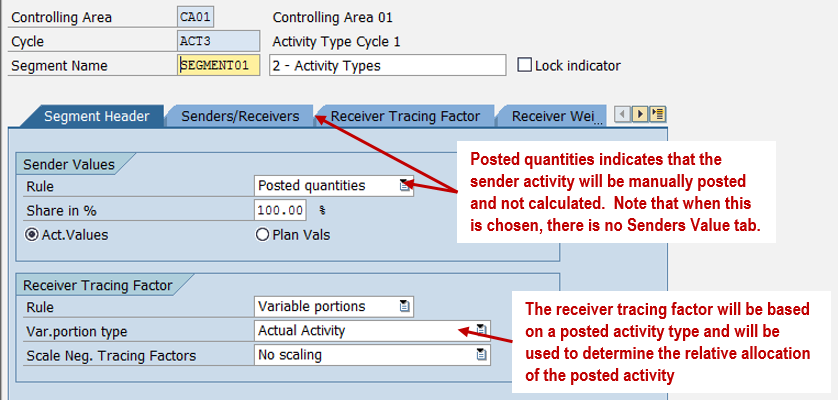
Create the classic actual allocation cycle ACT3 with KSC1. Its segment uses the sender rule Posted Quantities, because KB51N supplies the sender quantity. In this example, there is no Sender Values tab for calculating that quantity within the cycle.
Define Sender and Receiver Relationships
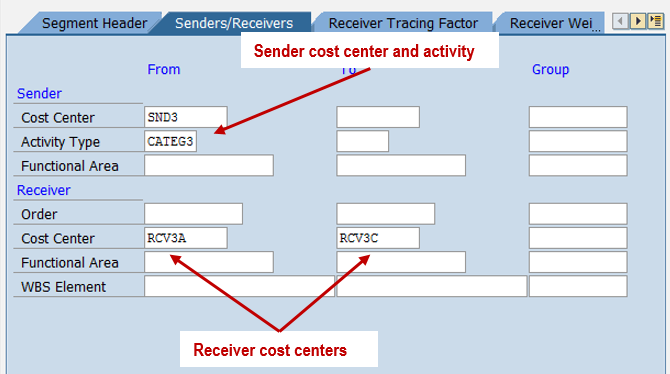
Specify SND3/CATEG3 as the sender and RCV3A, RCV3B, and RCV3C as receivers.
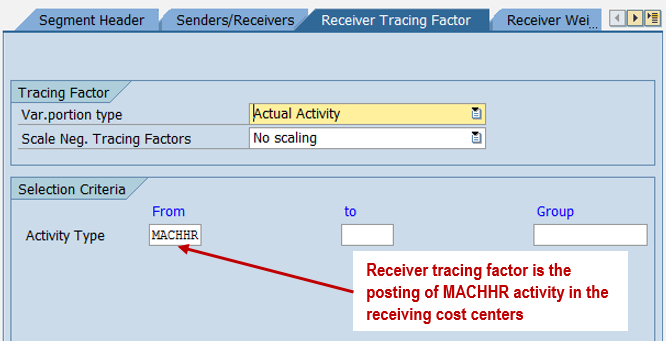
The Receiver Tracing Factor tab uses the receiver MACHHR activity. Its posted quantity, together with each receiver's weight, determines the relative allocation share.
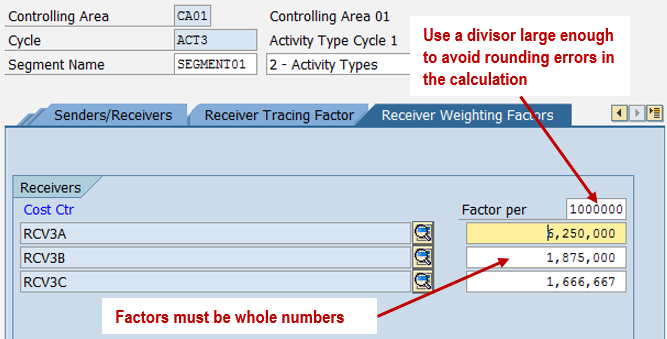
Maintain Receiver Weighting Factors
The classic screen stores whole-number weighting factors. This example uses a factor-per value of 1,000,000 to retain decimal precision: 6,250,000, 1,875,000, and 1,666,667 represent 6.25, 1.875, and approximately 1.666667. This reduces rounding effects; it does not eliminate finite-precision differences.
Post Sender Activity with KB51N
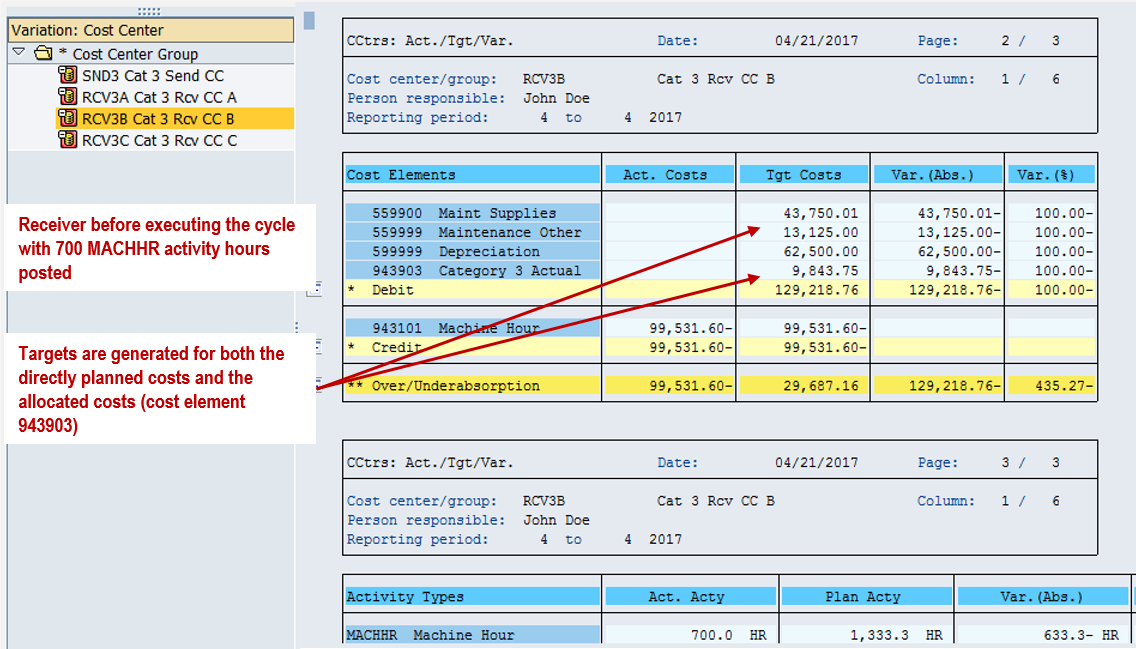
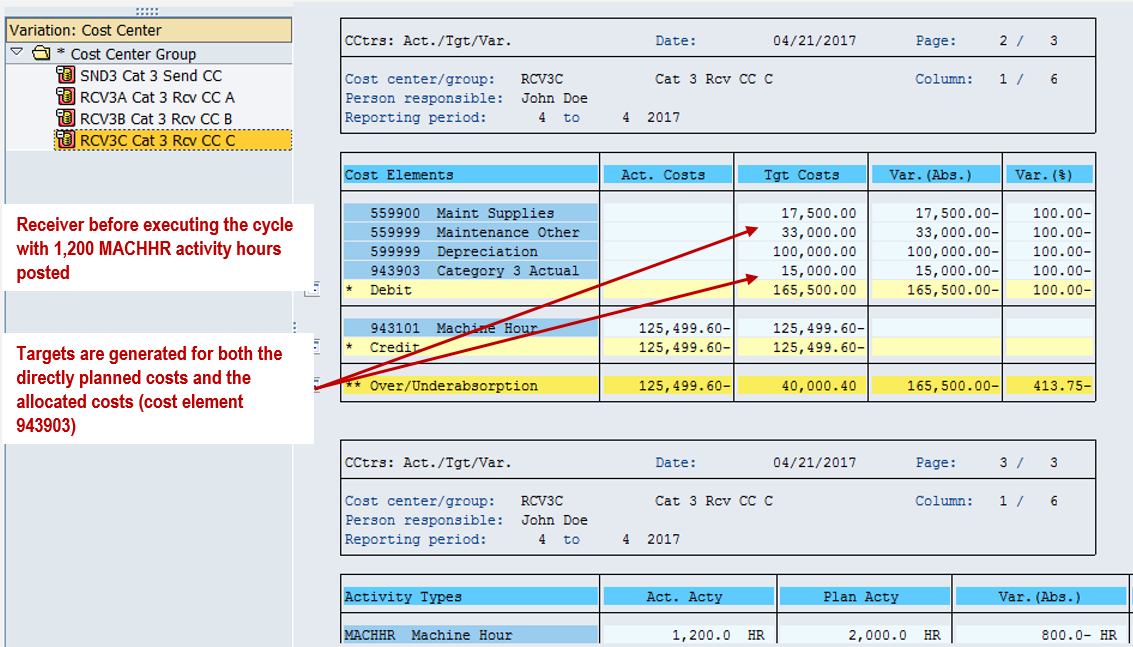
In period 4, RCV3A records 500 MACHHR hours, RCV3B records 700, and RCV3C records 1,200. Separately, the known support output on SND3 is 8,500 CATEG3 units.
Enter the 8,500 units with KB51N. No receiver is entered at this stage.
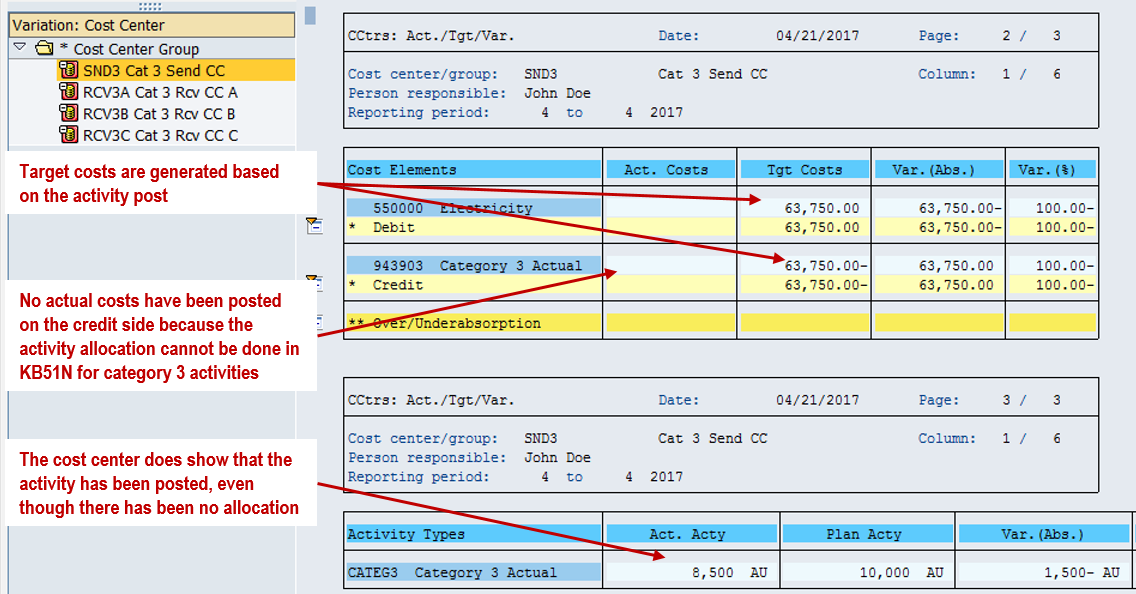
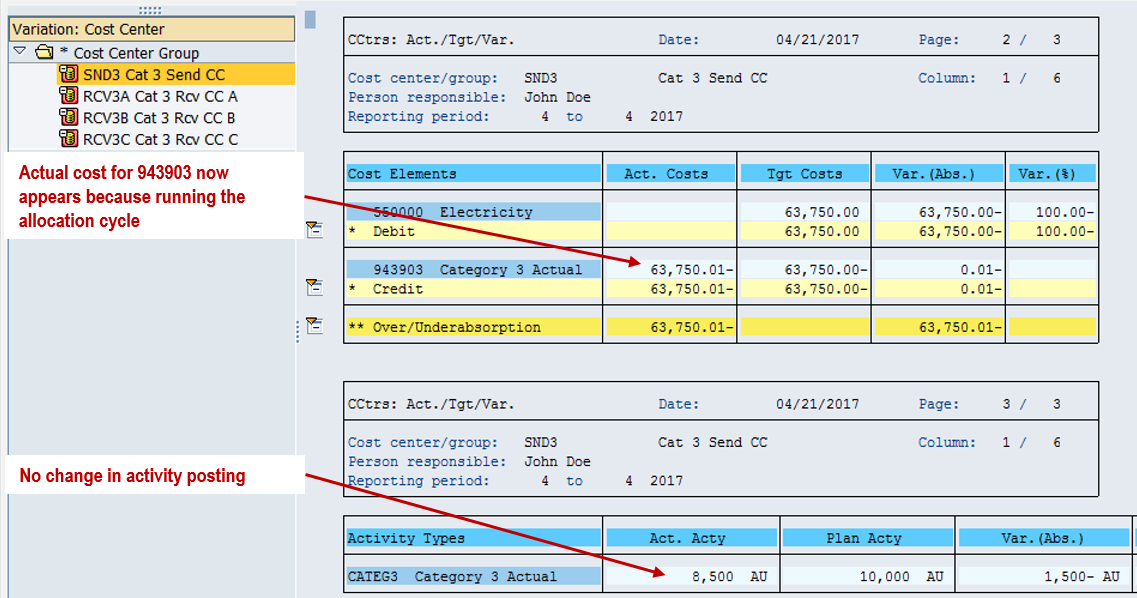
After quantity entry, SND3 has activity-based target values, but it has not yet received the allocation credit under cost element 943903.
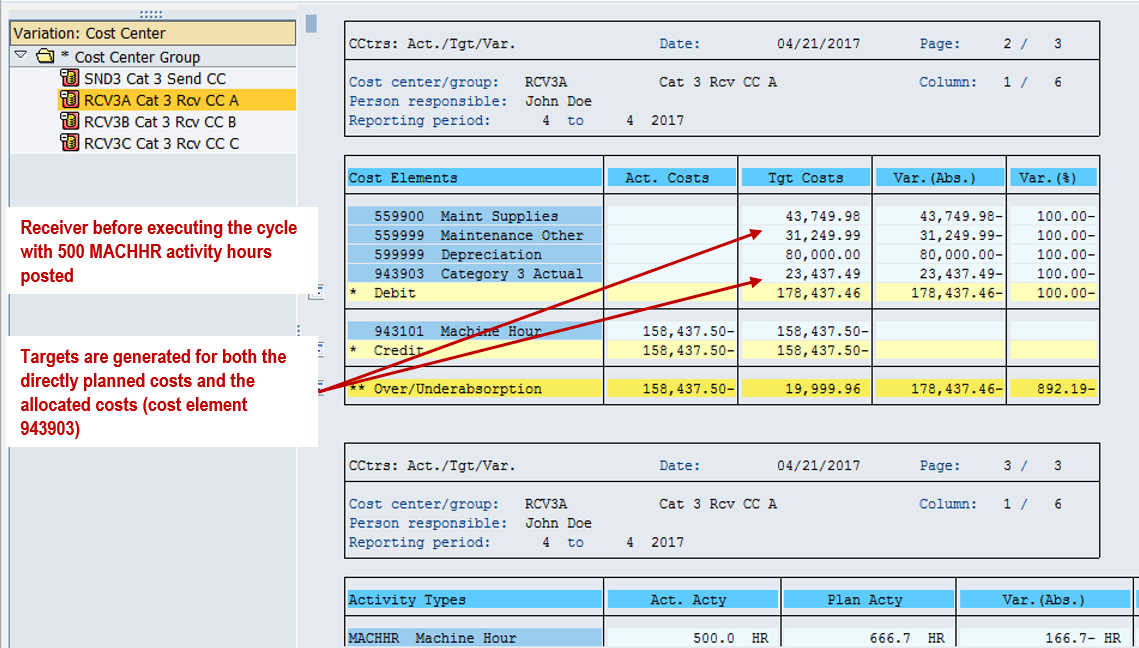
The receiver reports below show their position before running ACT3. Their MACHHR output supports target-cost calculations, while the CATEG3 allocation has not yet been posted.
Run KSC5 to Allocate the Posted Quantity
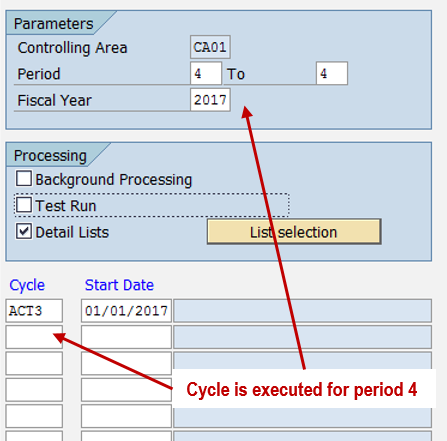
Execute actual indirect activity allocation with KSC5 for cycle ACT3 and the relevant fiscal year and period. Check the cycle selection, messages, and results.
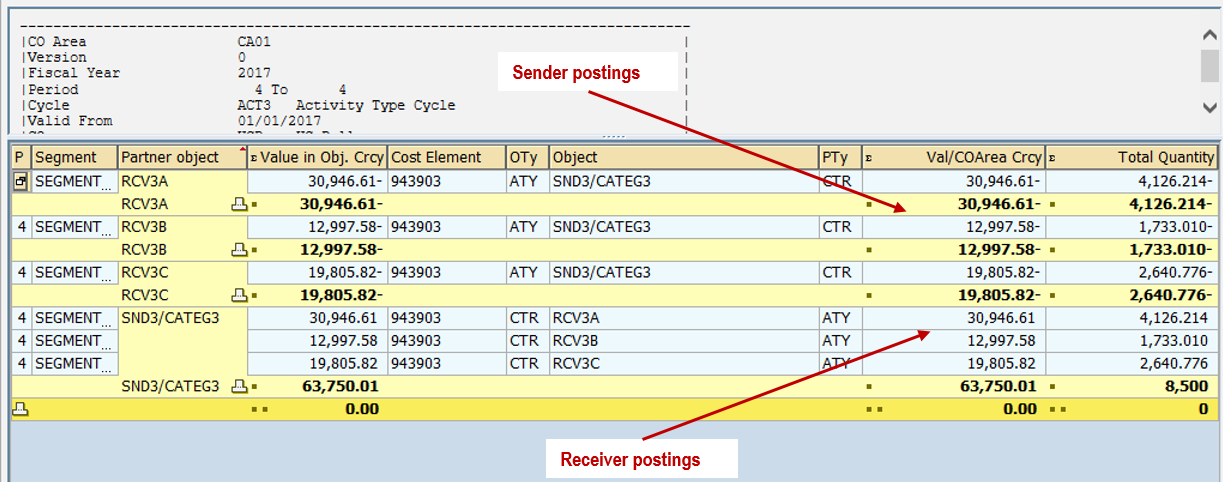
The allocation report shows all 8,500 posted CATEG3 units distributed to the three receivers, with corresponding sender and receiver values.
Calculate Receiver Shares
First multiply each receiver's actual MACHHR quantity by its planned consumption weight. Then divide that weighted quantity by the total of all receiver weights to calculate the receiver's share.
Receiver allocation quantity = posted sender quantity × receiver weighted tracing factor ÷ total weighted tracing factors.
| Receiver | Actual MACHHR | Weight per Hour | Weighted Tracing Factor | Allocated CATEG3 Units |
|---|---|---|---|---|
| RCV3A | 500 | 6.25 | 3,125 | 4,126.214 |
| RCV3B | 700 | 1.875 | 1,312.5 | 1,733.010 |
| RCV3C | 1,200 | 1.666667 | approximately 2,000 | 2,640.776 |
| Total | 2,400 | — | approximately 6,437.5 | 8,500.000 |
For example, RCV3A receives approximately 3,125 ÷ 6,437.5 × 8,500 = 4,126.214 units. The table follows the original example's rounded tracing-factor arithmetic; SAP uses the maintained factor precision when posting.
The 6,437.5 total is the allocation basis, not the sender output. Category 3 distributes the 8,500 units recorded with KB51N. It does not replace that amount with the sum of the weighted receiver quantities.
Review Sender Credits and Receiver Debits
After the cycle runs, SND3 shows the activity allocation credit under cost element 943903.
The receiving cost centers show their respective CATEG3 debits.
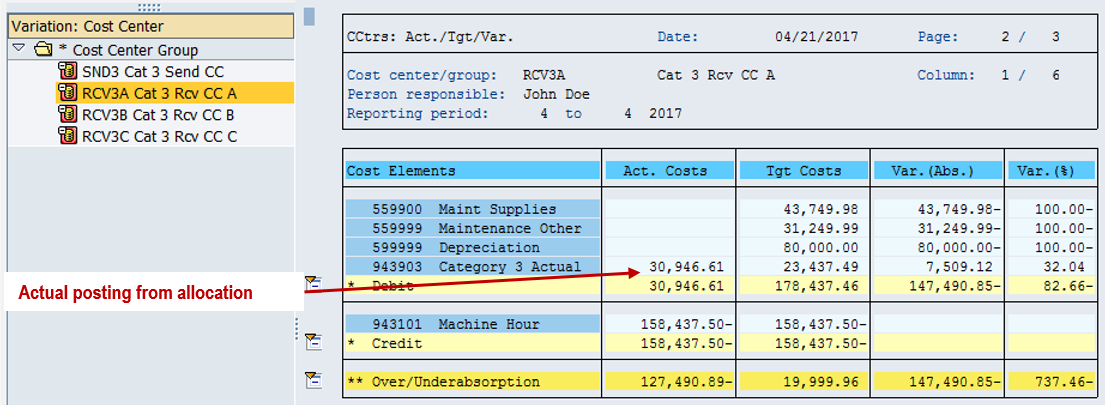
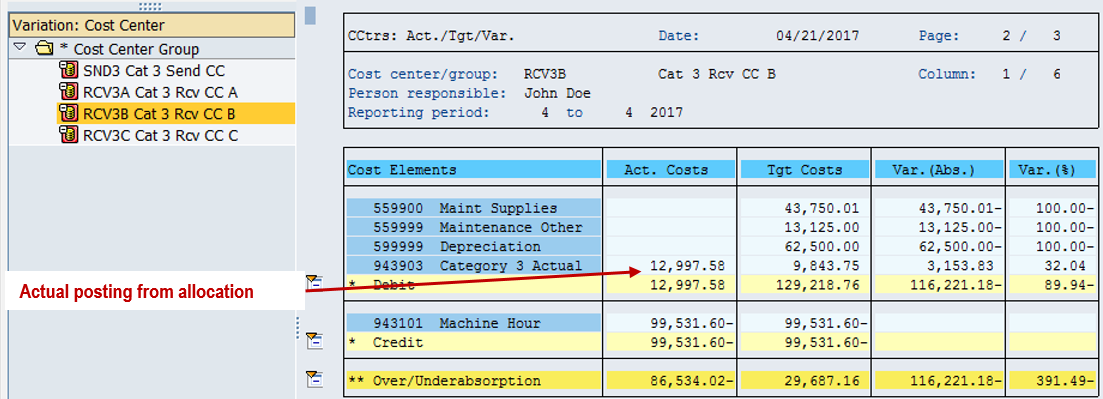
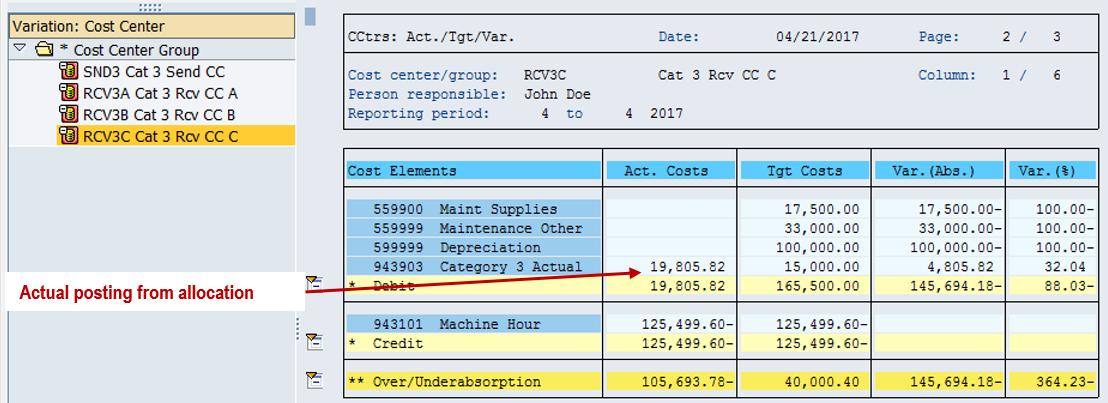
In the earlier category 2 example, sender activity was derived from receiver information. Here, the sender quantity is entered independently, so actual allocated costs can differ from receiver target costs. A difference does not by itself establish a configuration error; reconcile the posted quantity, tracing factors, activity price, and target-cost assumptions.
Actual price calculation and any subsequent revaluation are separate period-end processes with their own prerequisites. They are not demonstrated in this example.
More Activity Type Tutorials
- Next: Category 4: quantity recording without allocation
- Previous: Category 2 allocation using receiver activities
- All seven tutorials: SAP activity type posting series guide
Need Help with SAP Indirect Activity Allocation?
Trace how sender quantities, receiver weights, and activity prices create your allocation results. ERPCorp helps teams review cost center planning, activity type settings, allocation cycles, and Product Costing processes.
Glossary
Category 3 Activity Type
An activity type category for manual sender quantity entry followed by indirect allocation to receivers.
Indirect Activity Allocation
An allocation method that distributes activity quantities and associated costs using configured sender/receiver relationships and tracing factors.
KB51N
The SAP GUI transaction for entering sender activity quantities without a receiver assignment, used here before indirect allocation.
KSC5
The SAP GUI transaction used to execute actual indirect activity allocation cycles in this classic process.
Tracing Factor
An allocation basis that determines a receiver's relative share, such as the receiver's posted activity quantity.
Weighting Factor
A multiplier applied to a tracing factor to reflect relative resource consumption. This example derives weights from planned CATEG3 input per MACHHR hour.
SAP Documentation
Senders and Receivers for Indirect Activity Allocation
Learn more about the author on Tom King's speaker profile.