
By Tom King

SAP activity type category 4 records activity quantities on a cost center without allocating them to receiver objects. The quantity supports operating-rate and target-cost analysis while the costs remain on the cost center.
This tutorial shows how to plan activity type CATEG4 for cost center SND4, record 500 units with KB51N, and review the resulting variable target costs without an allocation posting.
Editorial update: The worked example and screenshots are from the original 2017 tutorial. They illustrate classic ECC and applicable SAP S/4HANA on-premise or Private Edition processes. Check transaction and category availability for your edition and release; SAP S/4HANA Cloud Public Edition has restricted supported settings and processes.
In This Article
Why Use an Activity Type Without Allocation?
Some cost centers need an output measure for cost control even when their costs should remain where they were incurred. Category 4 provides that quantity measure without creating a sender credit and receiver debit through activity allocation.
In this example, activity-dependent variable target costs respond to recorded output. The activity-independent fixed target costs remain at the fixed planned amount for the reporting period. You can then compare actual costs with targets appropriate to the activity performed.
Choose category 4 when you need quantity-based cost analysis without activity allocation. If you need to transfer activity costs to another object, review the category 1 direct allocation example or the indirect allocation categories instead.
Check Category 4 Master Data
The example activity type is CATEG4. Its planned and actual activity type categories are both 4: manual entry, no allocation. Category 4 cannot be combined with categories that permit allocation in the corresponding plan/actual settings.
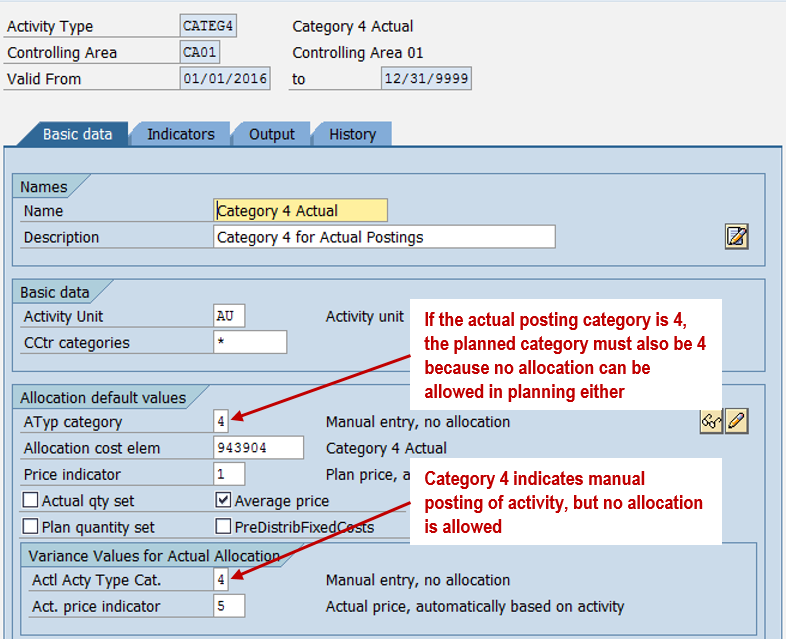
The master record also shows allocation cost element 943904. Its presence does not make category 4 allocatable. The category determines that no receiving cost object is entered for the sender activity posting.
Plan Activity Quantities, Costs, and Prices
Plan the Activity Quantity with KP26
Tom King's example plans 10,000 activity units for SND4/CATEG4 across fiscal year 2017 using KP26. Keep the annual plan separate from the selected period's activity when reviewing the reports.

Plan Fixed and Variable Costs with KP06
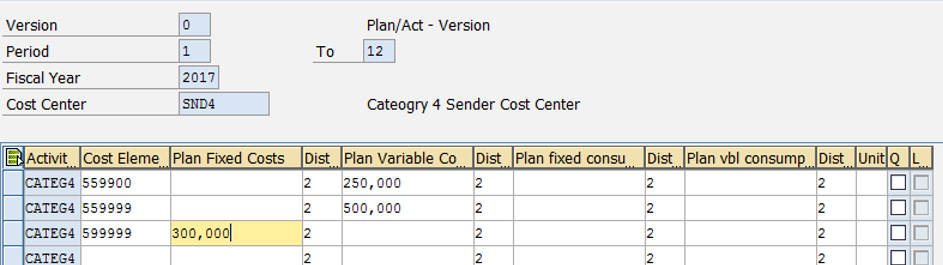
The primary cost plan is entered with KP06 and separates fixed and variable plan costs. It contains the following totals for periods 1–12:
| Cost Element | Fixed Plan Costs | Variable Plan Costs |
|---|---|---|
| 559900 | — | $250,000 |
| 559999 | — | $500,000 |
| 599999 | $300,000 | — |
| Total | $300,000 | $750,000 |
Calculate the Planned Activity Price with KSPI
The example calculates the planned price with KSPI. The result screen shows a total price of $105 per activity unit, including a $30 fixed portion.
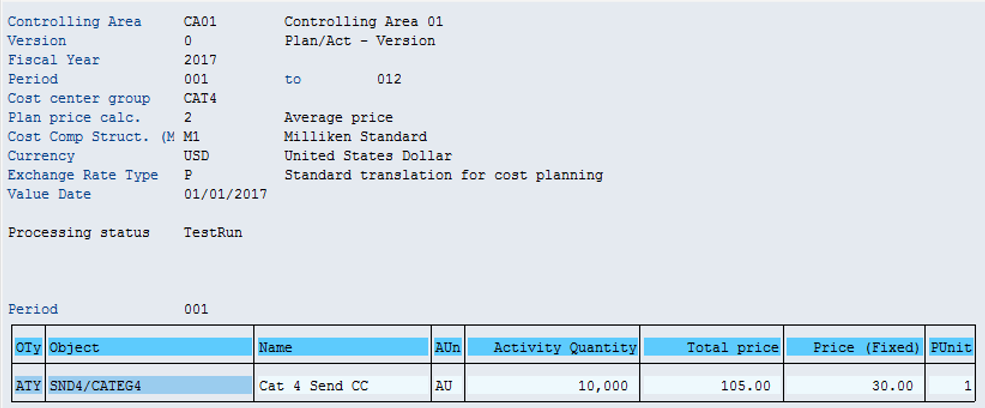
A calculated price does not create an allocation. Category 4 records quantities for cost control. Do not interpret 500 units multiplied by the total price as an actual transfer of costs to a receiver.
Post Activity with KB51N
Before recording activity, review SND4 in the Target/Actual/Variance report. With no actual activity recorded in this example, the activity-dependent variable target costs are zero.
Use KB51N to enter the sender cost center SND4, activity type CATEG4, and quantity. The screen does not provide a receiver account assignment for this sender activity posting.
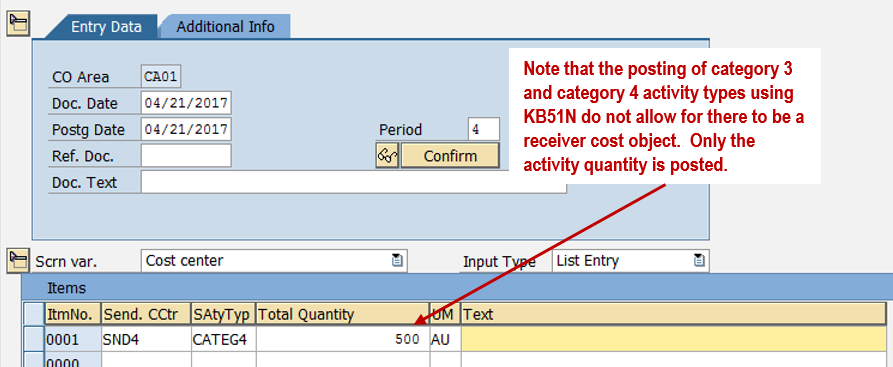
In April, period 4, the example records 500 units. This updates the activity quantity; it does not allocate activity costs to another object.
Review Target Costs and Variances
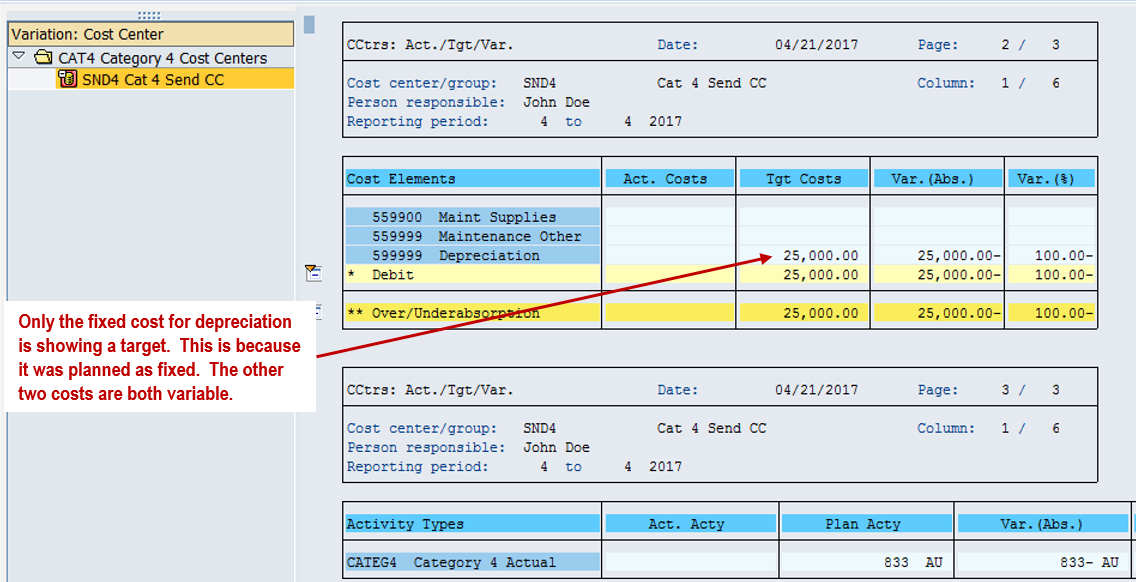
After posting the activity, the report shows 500 actual units and variable target costs for the costs assigned to CATEG4. There is no activity-allocation credit under cost element 943904.
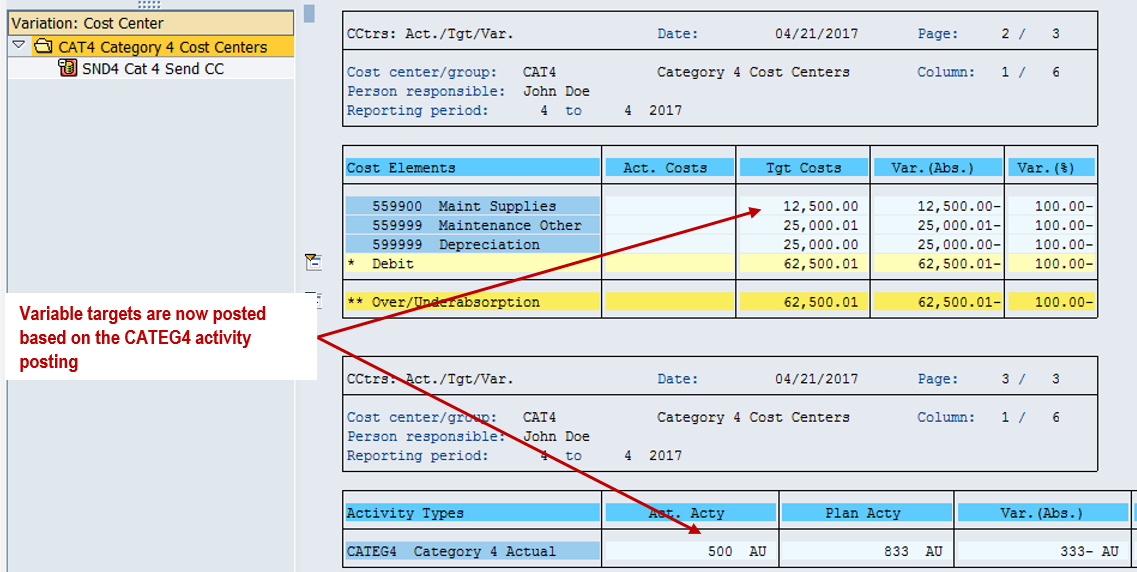
The screenshot displays variable targets of $12,500.00 and $25,000.01, plus a fixed target of $25,000.00. The total target is $62,500.01. Small differences from simplified arithmetic reflect the planning and reporting precision used in the example.
These target values are comparison amounts, not new actual expense postings. Once actual costs are recorded, compare them with the targets to analyze variances. The screenshot's blank actual-cost column should not be treated as a completed assessment of cost performance.
Category 4 therefore provides an output-based view of cost behavior while keeping the activity costs on SND4. Other separately configured allocation processes are outside the scope of this example.
More Activity Type Tutorials
- Next: Category 5: target=actual activity allocation with KNMA
- Previous: Category 3: manual entry and indirect allocation
- All seven tutorials: SAP activity type posting series guide
Need Help with SAP Activity Types and Cost Reporting?
Make activity quantities, target costs, and allocation settings easier to reconcile. ERPCorp helps teams review SAP cost center planning, activity type configuration, and Product Costing processes.
Glossary
Category 4 Activity Type
An activity type category for manual quantity entry without activity allocation to other objects.
KB51N
The SAP GUI transaction for entering sender activity quantities, used for category 4 in this classic example.
Operating Rate
A measure of actual activity relative to planned activity, used in determining activity-dependent target values.
Target Costs
Comparison values derived from planned costs and the relevant activity level. They are distinct from actual cost postings.
Variable Plan Costs
Planned costs that vary with activity output within the assumptions of the cost plan.
Fixed Plan Costs
Planned costs that do not vary with activity output within the assumptions of the plan.
SAP Documentation
Entering Sender Activities: non-allocable activity and target-cost analysis
Learn more about the author on Tom King's speaker profile.