
By Tom King

SAP activity type category 5 supports target=actual activity allocation. In the classic process, SAP calculates actual activity quantities from planned receiver activity inputs and operating rates, then posts the allocation with transaction KNMA.
This final tutorial in the activity posting series compares fixed and variable planned allocations. Both examples use activity type CATEG5 to allocate support activity from a sender cost center to manufacturing cost centers.
Editorial update: The worked examples and screenshots are from the original 2017 tutorial. This article describes classic ECC and applicable SAP S/4HANA on-premise or Private Edition processes. App, transaction, and category availability depends on your edition and release; check supported scope for SAP S/4HANA Cloud Public Edition.
In This Article
Category 5 Settings and Prerequisites
Category 5 is an actual allocation category. Use a separate planning category, such as 1, 2, or 3. Do not confuse the activity type category with the price indicator: they control different aspects of the process.
Before running KNMA, reconcile the sender output and receiver input plans, check the relevant activity prices, and confirm the fixed and variable portions of planned consumption. For variable allocation, receiver activity must also provide a meaningful operating rate. Inconsistent planning can produce incorrect allocation results.
Unlike category 2 allocation through KSC5, target=actual allocation uses the planned activity relationships without requiring a separate indirect activity allocation cycle. KNMA still depends on those planning relationships and master-data settings.
Fixed Allocation Example
Plan Fixed Receiver Consumption
The manufacturing activity MACHHR is planned in cost centers RCV5A, RCV5B, and RCV5C. These cost centers consume support activity CATEG5 from cost center SND5A. In this example, their support consumption is planned as fixed.
| Receiver Cost Center | Planned MACHHR (Hours) | Planned CATEG5 (Units) |
|---|---|---|
| RCV5A | 8,000 | 50,000 |
| RCV5B | 16,000 | 30,000 |
| RCV5C | 24,000 | 40,000 |
| Total | 48,000 | 120,000 |
In the classic example, KP06 layout 1-102 records the activity input plan. The RCV5A screen shows 50,000 units in the fixed consumption column.
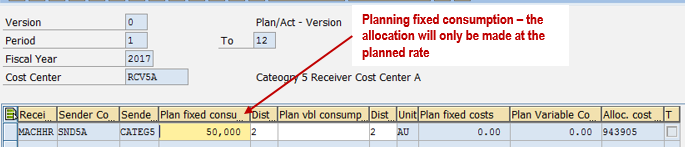
The sender is planned with fixed costs in this worked example. This cost split is an example assumption; the fixed consumption setting is what keeps the planned activity input unchanged when receiver output changes.
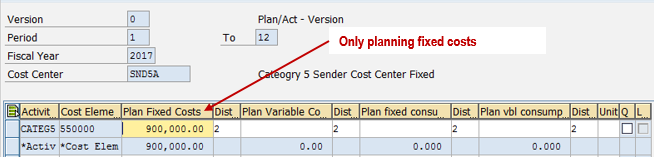
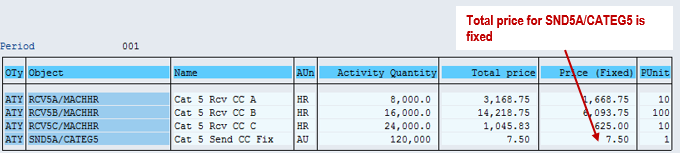
Run KSPI to calculate the planned activity price. Here the resulting CATEG5 price is entirely fixed.
Review April Activity Before KNMA
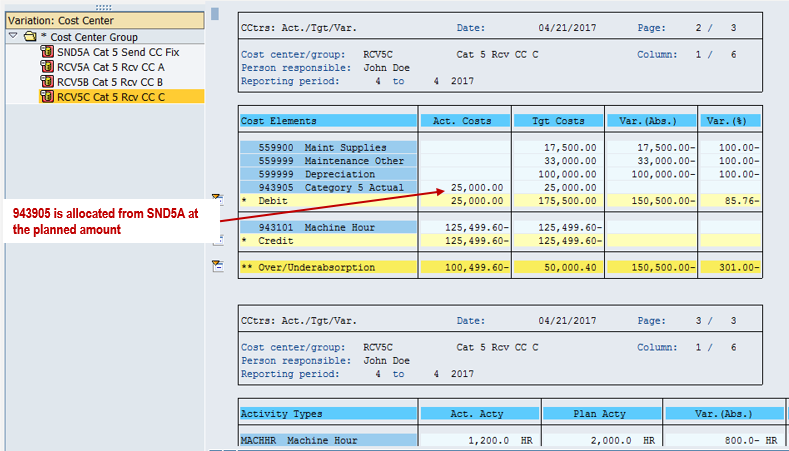
In period 4, the receivers record 500 MACHHR hours in RCV5A, 700 in RCV5B, and 1,200 in RCV5C. Review the sender and receiver Target/Actual/Variance reports before allocation.
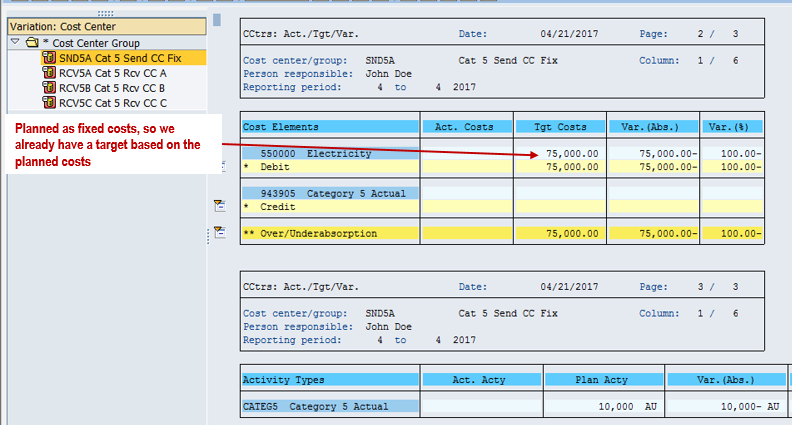
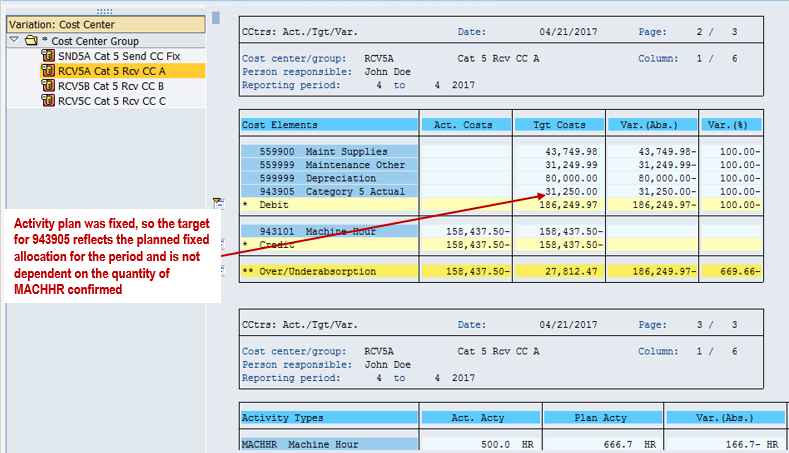
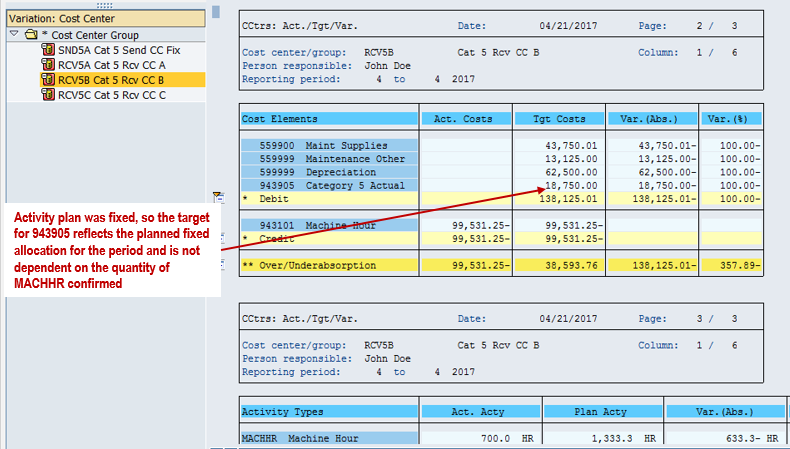
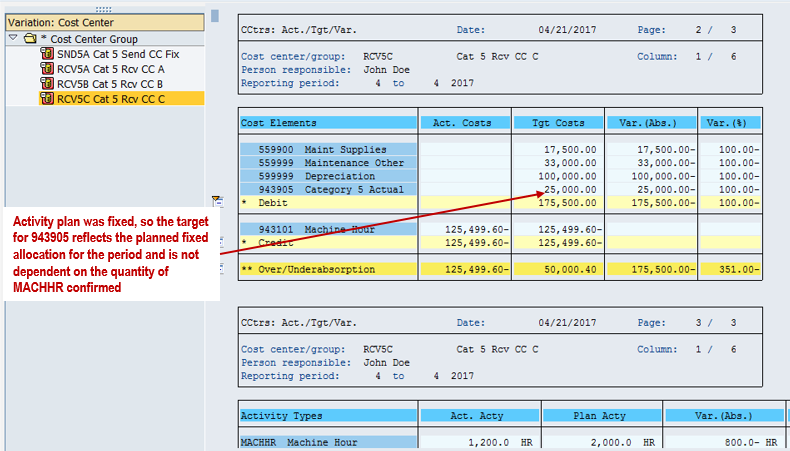
Because support consumption is fixed, its target quantity remains at the planned amount for the selected period rather than scaling with actual MACHHR output.
Run KNMA for the Fixed Allocation
Execute KNMA for the relevant controlling area, fiscal year, period, version, and cost center selection. Check the selection and processing results before relying on the posted values.
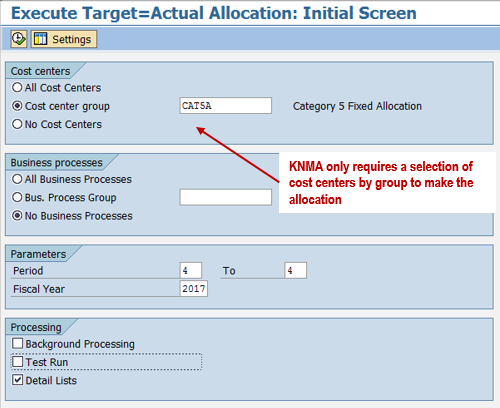
The fixed example shows a 100% operating rate for the sender CATEG5 activity: the planned fixed quantity for the period is transferred to actual.
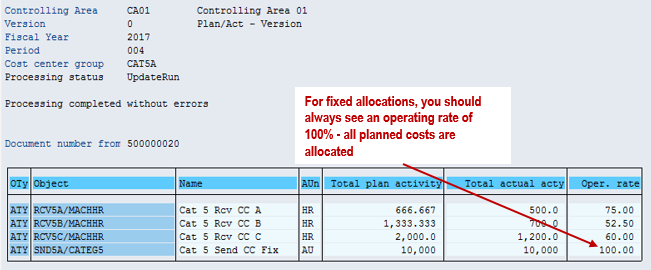
The receiver MACHHR operating rates still reflect their actual output relative to planned output. The fixed CATEG5 input does not scale with those rates.
Check Fixed Allocation Results
The sender report shows the activity allocated out, and the receiver reports show the corresponding allocation. Read all quantities for the selected reporting period; the 120,000-unit planning total above covers periods 1–12.
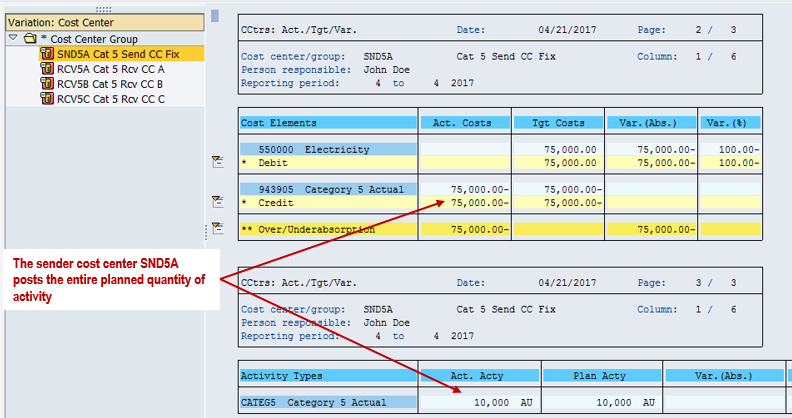
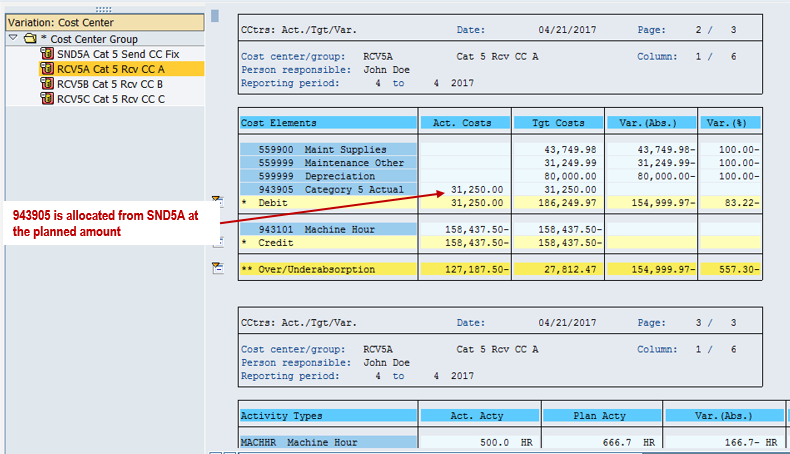
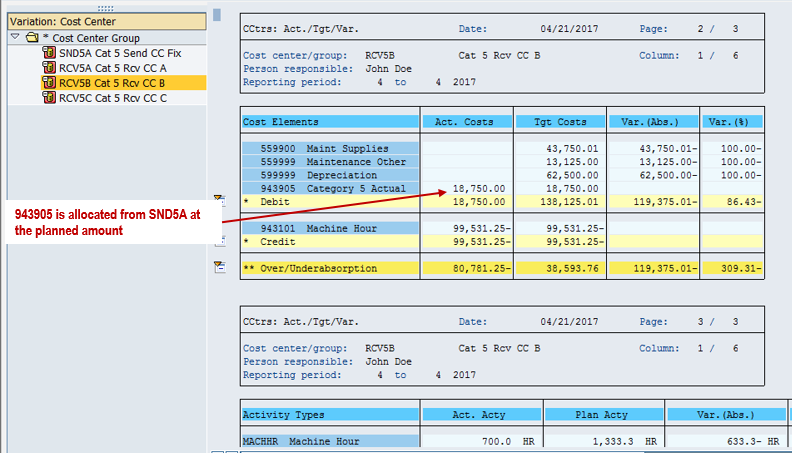
Variable Allocation Example
Plan Variable Receiver Consumption
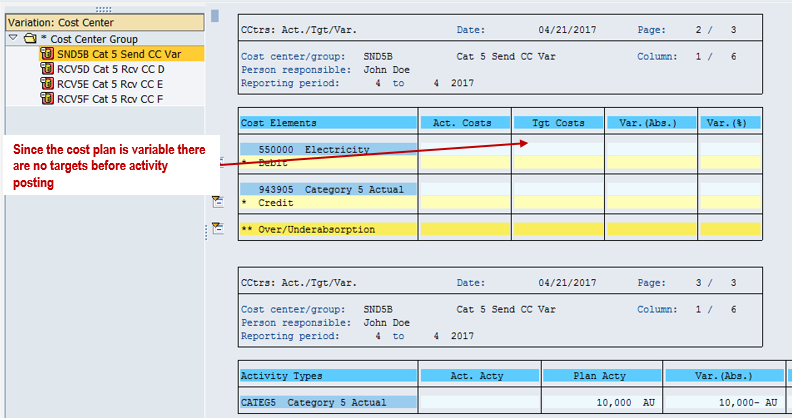
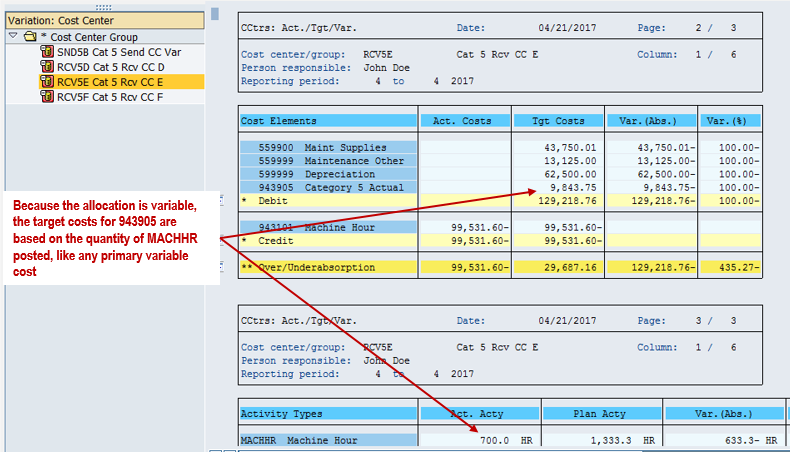
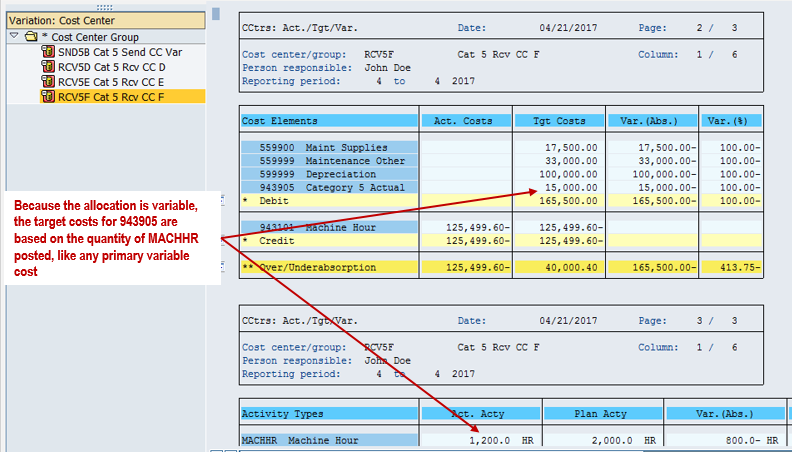
The second example uses sender SND5B and receivers RCV5D, RCV5E, and RCV5F. The planning quantities match the first example, but CATEG5 consumption is now variable. Actual receiver activity therefore affects how much support activity is allocated.
| Receiver Cost Center | Planned MACHHR (Hours) | Planned CATEG5 (Units) |
|---|---|---|
| RCV5D | 8,000 | 50,000 |
| RCV5E | 16,000 | 30,000 |
| RCV5F | 24,000 | 40,000 |
| Total | 48,000 | 120,000 |
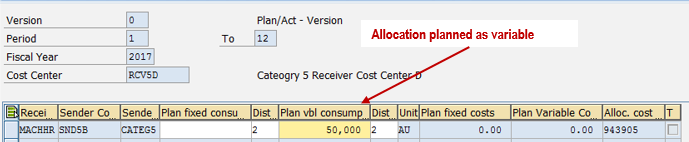
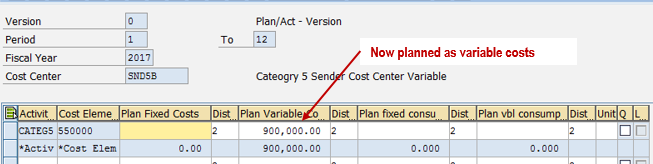
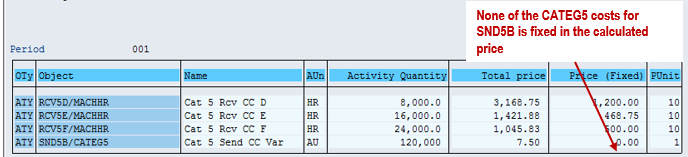
The sender costs are planned as variable in this example, producing an entirely variable activity price when KSPI is run.
Review April Activity Before Allocation
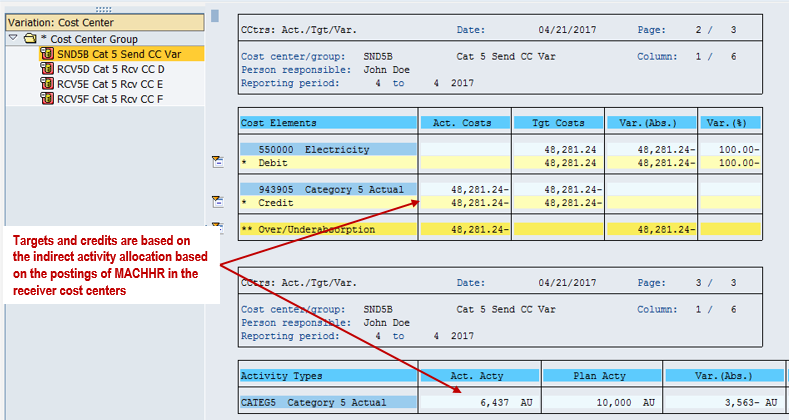
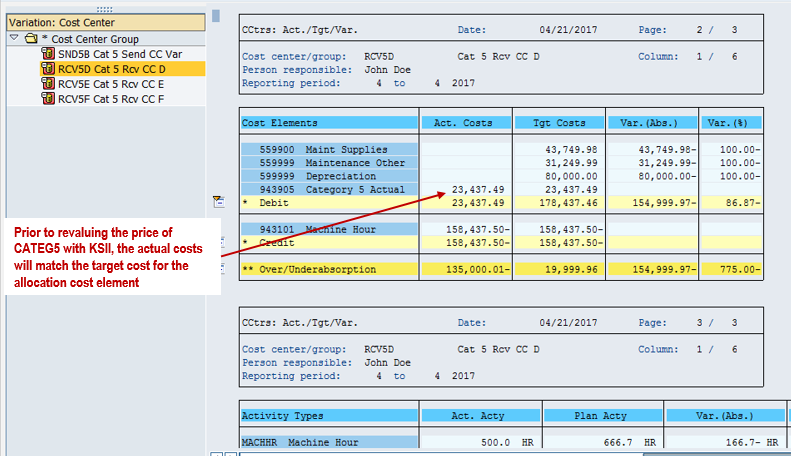
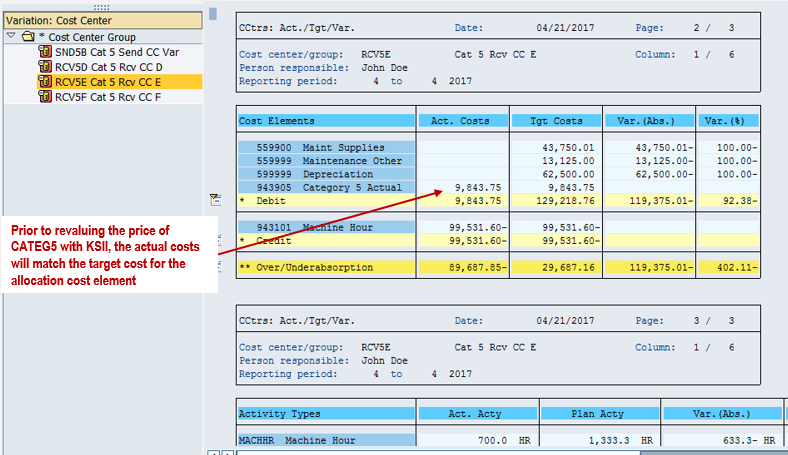
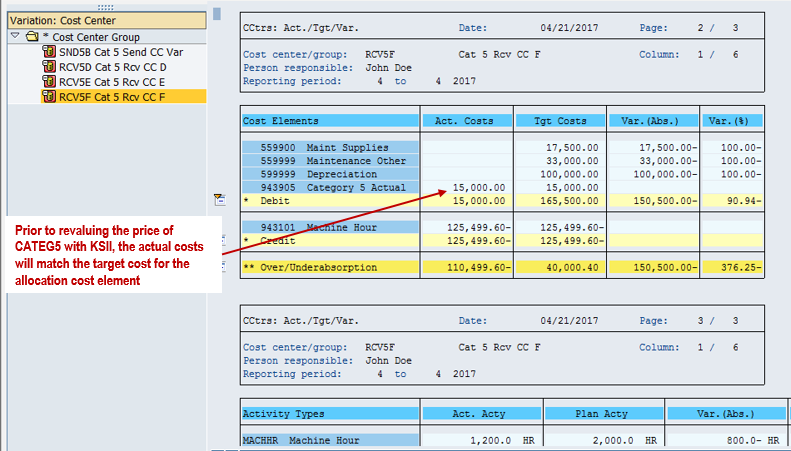
Period 4 MACHHR output is 500 hours in RCV5D, 700 in RCV5E, and 1,200 in RCV5F. The following reports show SND5B and two of its receivers before allocation.
Run KNMA and Review the Operating Rate
Run KNMA for SND5B and its receiver relationships. The results screen shows receiver MACHHR operating rates of 75%, 52.50%, and 60%. The sender SND5B/CATEG5 row displays an operating rate of 64.37% and an actual quantity of 6,437.499 units against 10,000 planned units for period 4.
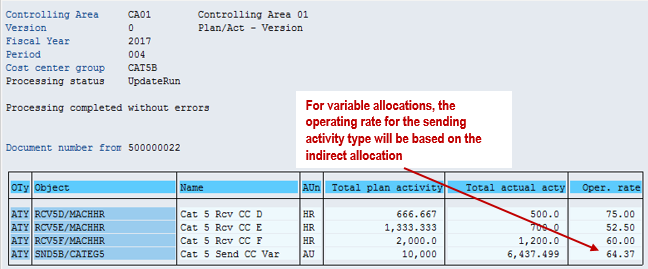
The 64.37% is the displayed result for this particular plan and actual activity mix. It is not a standard SAP rate. Use the quantities and precision shown in the allocation results when reconciling your own postings.
Check Variable Allocation Results
Compare the sender and receiver reports with the fixed example. The support quantity now follows the variable planned relationships adjusted for receiver operating rates.
Fixed vs. Variable: What Changes?
Fixed planned consumption transfers the selected period's fixed planned quantity to actual. Variable planned consumption scales with receiver operating rates. Both can be processed by the classic target=actual method, provided the planning and master data are consistent.
In our original implementation, we first used KNMA for fixed allocations. When we moved to variable allocations, we used category 2 cycles with KSC1 and KSC5. We later discovered that KNMA could also handle the variable planned relationships in this example. The lesson is to review the available allocation methods against the business requirement before adding another cycle.
More Activity Type Tutorials
- Previous tutorial: Category 4 activity types: quantity recording without allocation
- Compare the alternative: Category 2 allocation using receiver activities
- Review all seven articles: SAP activity type posting series guide
Need Help with SAP Activity Allocation?
Review whether fixed or variable planned consumption explains your support costs. ERPCorp helps teams assess activity type settings, cost center planning, allocation methods, and Product Costing in SAP.
Glossary
Category 5 Activity Type
An actual activity type category used for target=actual activity allocation. Planning uses a separate category such as 1, 2, or 3.
Target=Actual Activity Allocation
A classic indirect allocation method that derives actual activity quantities from planned activity inputs and receiver operating rates.
Operating Rate
A measure of activity output relative to planned activity. In the variable example, receiver operating rates determine the adjustment to planned support consumption.
Fixed Planned Consumption
The part of planned receiver activity input that does not scale with receiver output and is transferred from plan to actual by target=actual allocation.
Variable Planned Consumption
The part of planned receiver activity input adjusted for receiver operating rates in target=actual allocation.
KNMA
The SAP GUI transaction used to execute the classic target=actual activity allocation process illustrated in this tutorial.
SAP Documentation
Learn more about the author on Tom King's speaker profile.