
By John Jordan

Introduction
SAP S/4HANA provides several methods for allocating overhead costs to products and manufacturing orders. Common approaches include activity rates, template allocation, and costing sheets.
Table of Contents
Overhead Allocation Methods
1. Activity Rate
You can either increase the planned activity price to include overhead, or create separate overhead activity types. Manufacturing orders are debited during activity confirmation, and production cost centers are credited.
2. Templates
Template allocation provides a more flexible, driver-based way to determine resource or process consumption and allocate the resulting costs to cost objects.
3. Costing Sheets
Costing sheets calculate overhead using defined calculation bases, rates, and credit keys. They can calculate planned overhead in product cost estimates and allocate actual overhead to manufacturing orders. Classic actual overhead calculation normally runs during period-end closing. Supported SAP S/4HANA scenarios also provide event-based overhead calculation when configured.
A costing sheet applies overhead without requiring separate confirmations of overhead activities. Design the calculation base and rates carefully to avoid charging the same overhead both through activity prices and through a costing sheet.
Configure a Costing Sheet
In SAP S/4HANA on-premise and SAP S/4HANA Cloud Private Edition, use transaction KZS2 to maintain costing sheets, or follow the IMG path below. The screenshots illustrate the classic configuration. SAP S/4HANA Cloud Public Edition uses its supported configuration activities rather than this unrestricted IMG procedure.
Controlling - Product Cost Controlling - Product Cost Planning - Basic Settings for material Costing - Overhead - Define Costing Sheets.
The screen in Figure 1 is displayed.
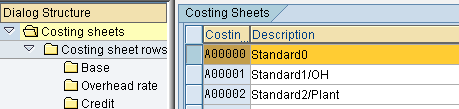
Figure 1: Costing Sheet Overview
Available costing sheets are listed on the right of the overview screen. In this example, select costing sheet A00000 and double-click Costing sheet rows on the left to display the screen shown in Figure 2.
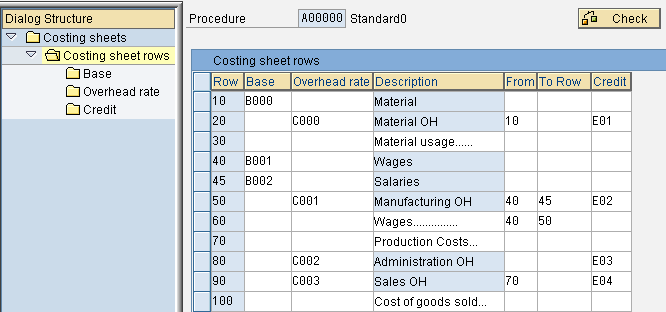
Figure 2: Costing Sheet Rows Overview
Costing Sheet Components
A costing sheet brings together the following three components.
Costing Sheet Calculation Base
Select any row with an entry in the Base column and double-click Base at the left to display a screen that allows you to enter cost elements and origin groups. Each cost element identifies unique cost types within a cost estimate, such as raw material or machining costs. For percentage-based overhead, the selected base amount is multiplied by the overhead percentage. Quantity-based overhead uses the eligible base quantity and a rate per unit.
Costing Sheet Overhead Rate
Select a row with an entry in the Overhead rate column and open the corresponding rate settings. Depending on the costing sheet, overhead can use a percentage-based or quantity-based rate, with validity dates and applicable conditions. Check the required planned or actual overhead type.
Costing Sheet Credit Key
Select a row with an entry in the Credit column and open the credit settings. The credit key specifies the object credited during actual overhead calculation, such as a cost center or order, and the overhead cost element used. In SAP S/4HANA, this is a G/L account for secondary costs with cost element category 41 (Overhead Rates).
During actual overhead calculation, SAP debits the relevant manufacturing order and credits the configured object, such as a cost center. Calculating overhead in a material cost estimate determines planned product costs; it does not itself post actual overhead to an order or credit a cost center.
Costing Sheet Example
If eligible material costs are $1,000 and the overhead rate is 10%, the planned overhead in the product cost estimate is $100. If the actual eligible base is $1,200 and the actual rate is also 10%, actual overhead is $120. The actual calculation debits the order and credits the configured object using the overhead account.
SAP Costing Sheets Summary
SAP costing sheets provide a flexible method for allocating overhead costs to products and manufacturing orders. Calculation bases identify eligible costs or quantities, rates determine the overhead amount, and credit keys control actual credits. The timing of actual calculation depends on whether classic period-end or supported event-based processing is configured.
Improve Product Cost Accuracy with SAP Costing Sheets
Overhead allocation affects product costs and margins. ERPCorp helps you review costing sheets, refine calculation bases and overhead rates, and verify credit postings—so your team can understand and explain how overhead flows into product costs.
Glossary
Activity Rate
The price used to value an internal activity allocation for a cost center and activity type, such as a rate per machine hour. Also called an activity price, it can include fixed and variable portions and may be maintained manually or calculated. The allocated cost depends on the activity quantity, rate, and price unit.
Activity Type
A master-data classification of work performed by a cost center, such as machine hours. Activity quantities and prices are used to value internal activity allocations.
Calculation Base
The eligible cost elements and, where required, origin groups or quantities to which an overhead rate is applied.
Cost Center
An organizational unit used to collect and control costs for a defined area of responsibility. It can receive the credit from actual overhead calculation.
Costing Sheet
A configuration structure linking calculation bases, overhead rates, and credit keys to calculate overhead.
Costing Variant
The control settings for a cost estimate, including the costing type, valuation variant, date control, and quantity structure control.
Credit Key
The costing-sheet setting that specifies the credited object and overhead cost element for actual overhead allocation.
Event-Based Overhead Calculation
Calculation and posting of actual overhead triggered by relevant business postings in supported SAP S/4HANA scenarios. It requires suitable configuration.
Origin Group
A key that distinguishes origins within the same cost element, allowing more detailed overhead bases and cost-component assignments.
Overhead Group
A material-master grouping used to assign materials to an overhead key for differentiated overhead calculation.
Overhead Key
A key that can be used in overhead-rate conditions to apply different rates to different materials or cost objects.
Overhead Rate
A percentage or amount per eligible unit used to calculate overhead, subject to its validity and applicable conditions.
Price Unit
The number of material units to which a price applies. Price per unit equals the maintained price divided by the price unit; $250 per 100 units equals $2.50 per unit.
SAP Fiori
SAP’s user-experience design approach and application experience. Data access depends on the application; Fiori apps do not universally read ACDOCA directly.
Template
A dynamic calculation tool used in SAP template allocation. Functions, formulas, and cost drivers determine the resources or business processes consumed by a cost object. The resulting quantities are valued using the relevant prices to allocate costs from business processes or cost center/activity type combinations. It can supplement or replace conventional overhead allocation.
Universal Journal
The integrated financial and management accounting line-item model in SAP S/4HANA, centered on actual postings in ACDOCA. Financial plan data is stored separately in ACDOCP.
Valuation Variant
A costing-variant component defining valuation strategies for materials, activities, and external services, including the relevant overhead settings.
SAP Documentation
- Costing sheets and event-based overhead calculation
- Calculation bases, percentage-based and quantity-based overhead
Meet the Author: John Jordan
Explore John’s expertise in SAP Product Costing and S/4HANA Finance, his SAP PRESS books, and his work with the SAP Controlling community.