
By Tom King
 When my company began moving from SAP ECC 6.0 to SAP S/4HANA, I used a sandbox to find out what the conversion would change for Controlling. I tested familiar transactions, checked how actual postings appeared in the Universal Journal, and ran Actual Costing in Material Ledger.
Release context. These observations come from an SAP S/4HANA 1709 sandbox. Use the simplification items and test results for your target release and edition when planning a conversion today.
Table of Contents
- Introduction
- SAP GUI and SAP Fiori
- Simplification List and Legacy Transactions
- Universal Journal and CO Data
- Material Ledger and Actual Costing
- What to Test Before Conversion
- Glossary
Introduction
We were in the early stages of converting from ECC 6.0, and classic versus New G/L was not an issue for our starting landscape. Working in a sandbox gave me a better sense of how the new system behaved and what I needed to check in our own processes.
SAP GUI and SAP Fiori
Logging in through SAP GUI or SAP Business Client felt familiar, and many of our existing transactions and processes still worked in the test client. That familiarity can ease the transition for users. The conversion still needs testing wherever transactions, processes, or roles change.
I looked for a Fiori tile that would flag problem production orders and let me drill into a list. In that test client, I found tiles that launched familiar transactions and enhanced reports, but I did not find the dashboard I wanted. App availability has changed since 1709. For more recent examples, see SAP Fiori apps for manufacturing variance analysis.
Simplification List and Legacy Transactions
The SAP S/4HANA 1709 Simplification List identified CKUC as an alternative to KKE1, KKE2, and KKE3 for base planning objects. I expected KKE1 to be unavailable, but it still opened in my sandbox. SAP Note 2133644 discusses the historical availability of those transactions. SAP Notes 2270335 and 2349294 cover replacement transactions and changes to reference and simulation costing. Some related reports were obsolete even when the transaction itself could still be called.
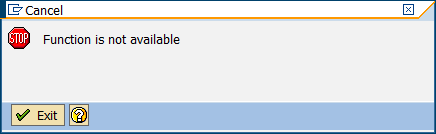
For ad hoc estimates, evaluate unit costing with CKUC or Easy Cost Planning. Base planning objects were useful to us as reusable costing references, so the replacement needed to cover that use case. Figure 1 shows the type of message you may see when a transaction is unavailable.
Universal Journal and CO Data
The Universal Journal brings FI and many actual CO line items together in ACDOCA. This reduces the need to reconcile separate FI and CO data stores for postings captured together. It also affects custom reporting that reads older CO tables.
In the 1709 data model, actual CO postings with value type 04 are stored in ACDOCA, and SAP provides compatibility views for familiar names such as COEP, COSP, and COSS. Statistical postings with value type 11 have legacy storage details documented in SAP Note 2270404. Other value types, including the classic plan and target values discussed in that note, still use legacy structures where applicable. SAP documents COSP_BAK and COSS_BAK for retained data and V_COEP_ORI for access to original COEP data.
In my sandbox, a manual activity allocation also produced a U4 line in legacy COEP data. When validating a custom report or extract, check the posting and value type it consumes. For more context, see Product Cost Controlling with SAP S/4HANA.
Material Ledger and Actual Costing
Material Ledger is required for material valuation in SAP S/4HANA. Actual Costing is optional. The transition changes data structures and can affect period-end processes, reporting, and posting detail.
After hearing Rogerio Faleiros’s 2017 SAP Controlling Conference presentation on Material Ledger, I tested the Actual Costing run in CKMLCP using purchase price and usage variances. In 1709, the Settlement step combined single-level price determination, multilevel price determination, revaluation of consumption, and WIP revaluation. The revised run was easier for me to use. I particularly wanted to retest how it handled material locks and items that had failed to close in a prior run.
The financial documents in my test used the PRV account determination instead of separate single-level and multilevel difference postings. Because our ECC implementation did not use separate G/L accounts for those differences, the impact on our accounting was limited. Teams that rely on that split for variance analysis should test how they will obtain the detail they need in the target system.
For the historical changes, see SAP Notes 2354768, 2332591, 2352383, and 2267834 in the 1709 simplification documentation. For a more recent overview, see SAP Material Ledger in S/4HANA: Roadmap to Actual Costing.
What to Test Before Conversion
- Run the transactions and Fiori apps your teams use and verify release-specific replacements.
- Compare FI and CO postings and validate the value types, views, and extracts used in custom reports.
- If you run Actual Costing, execute a representative period-end close and compare the resulting accounts, variance detail, and exception handling.
For more on interpreting manufacturing differences after conversion, see Production Variance Analysis in SAP S/4HANA.
SAP S/4HANA Controlling Consulting
ERPCorp helps teams assess Controlling impacts before conversion and test Product Costing, Material Ledger, and Actual Costing in the target system.
Explore SAP S/4HANA Consulting
Glossary
Activity Input Planning
Just as cost centers can provide planned output services based on activity quantities with Transaction KP26, you can plan cost center activity input quantities from other cost centers with activity input planning using Transaction KP06.
Activity Type
An activity type identifies activities provided by a cost center to manufacturing
orders. The secondary type general ledger account associated with an activity type identifies the activity costs on cost center and detailed reports.
Actual Costing
Actual costing determines what portion of the variance is debited to the next-highest level using material consumption. All purchasing and manufacturing difference postings are allocated upward through the BOM to assemblies and finished goods. Variances can be rolled up over multiple production levels and company codes to the finished product.
Actual Costs
Actual costs debit a product cost collector or manufacturing order during business transactions, for example, general ledger account postings, inventory goods movements, internal activity allocations, and overhead calculation.
Allocation Structure
An allocation structure allocates the costs incurred for a sender by cost element or cost element group, and it is used for settlement and assessment. An assignment maps a source cost element group to a settlement general ledger account.
Alternative Bill of Materials
There can be multiple methods of manufacturing an assembly, and many possible bills of materials (BOMs). The alternative BOM allows you to identify one BOM in a BOM group.
Alternative Hierarchy
While there can only be one cost center standard hierarchy, you can create as many alternative hierarchies as you like. You create an alternative hierarchy by creating cost center groups.
Alternative Unit Of Measure
This is a unit of measure defined in addition to the base unit of measure. Examples of alternative units of measure include order unit (purchasing), sales unit, and unit of issue.
Apportionment Method
An apportionment method distributes the total costs of a joint production process to the primary products. The costs of the individual primary products may vary. They are apportioned by means of an apportionment structure.
Apportionment Structure
An apportionment structure defines how costs are distributed to co-products. The system uses the apportionment structure to create a settlement rule that distributes costs from an order header to the co-products. For each co-product, the system generates a further settlement rule that assigns the costs distributed to the order item to stock.
Assembly Scrap
Assembly scrap is the percentage of assembly quantity that does not meet required quality standards. Assembly scrap is an output scrap because it increases the planned output quantity of items in the production process. You can maintain assembly scrap in the material master. The Net ID setting on a BOM item affects whether assembly scrap is included in the calculation for that item.
Automatic Account Assignment
Automatic account assignment allows you to set a default cost center per general ledger account per plant.
Base Planning Object
You may use Base Planning Objects before there is no master data (material master, BOM, routing, master recipe) in the system.
Base Unit of Measure
Material stocks are managed in the base unit of measure. The system converts all quantities you enter in other units of measure (alternative units of measure) to the base unit of measure.
Bill of Material
A bill of material (BOM) is a structured hierarchy of components necessary to build an assembly. BOMs, and purchasing info records allow cost estimates to calculate material costs of assemblies.
BOM Application
A BOM application is a costing variant component for automatic determination of alternative BOMs.
BOM Group
A BOM group is a collection of BOMs for a product or number of similar products.
BOM Item Component Quantity
The quantity of a BOM item that is entered in relation to the base quantity of the product.
BOM Item Status
Six indicators, such as costing relevancy, are contained in the Status/Long Text tab of a BOM item.
BOM Status
This controls the current processing status of the BOM. For example, a BOM may have a default status of not active when initially created, which then may be changed to active when the BOM is available for use in material requirements planning (MRP) and released for planned orders.
BOM Usage
This determines a section of your company, such as production, engineering, or costing. You define which item statuses can be used in each BOM usage; for example, all items in BOMs with a certain usage may be relevant to production.
Bulk Material
Bulk materials are not relevant for costing in a cost estimate and are expensed
directly to a cost center. The Bulk Material checkbox is maintained in the MRP 2 view and the BOM item. If a material is always used as a bulk material, set the indicator in the material master. If a material is only used as a bulk material in individual cases, set the indicator in the BOM item, which has a higher priority.
Calculation Base
A calculation base is a group of cost elements to which overhead is applied. The calculation base is a component of a costing sheet, which summarizes the rules for allocating overhead.
Capacity Category
Capacity category enables you to differentiate between machine and labor capacity. Machine capacity is the availability of a machine based on planned and unplanned outages and maintenance requirements. Labor capacity is the number of workers who can operate a machine at the same time.
Chart of Accounts
A chart of accounts is a group of general ledger accounts assigned to each company code. This chart of accounts is the operative chart of accounts used in both financial and cost accounting. All companies within the one controlling area must have the same operative chart of accounts. Other charts of accounts include the country-specific chart of accounts required by individual country legal requirements and the group chart of accounts required by consolidation reporting.
Company Code
A company code is the smallest organizational unit of financial accounting for
which a complete self-contained chart of accounts can be drawn up for external reporting.
Component Scrap
Component scrap is the percentage of component quantity that does not meet required quality standards before being inserted in the production process. The plan quantity of components is increased. Component scrap is an input scrap because it is detected before use in the production process. You can plan component scrap in the MRP 4 view and the Basic Data tab of the BOM item. An entry in the BOM item field takes priority over an entry in the material master MRP 4 view.
Condition
Conditions are stipulations agreed upon with vendors, such as prices, discounts, surcharges, freight, duty, and insurance. You maintain purchasing conditions in quotations, purchasing info records, outline agreements, and orders.
Condition Technique
The condition technique is used to determine the purchase price by consideration of all the relevant pricing elements. A feature of the technique is the formulation of rules and requirements.
Condition Type
A condition type is a key that identifies a condition. The condition type indicates, for example, whether the system applies a price, a discount, a surcharge, or other pricing, such as freight costs and sales taxes.
Confirmation
A confirmation documents the processing status of orders, operations, and individual capacities. You specify the operation yield, scrap and rework quantity, the activity quantity, work center, and who performed the operation.
Consignment Material
Consignment occurs when a vendor maintains a stock of materials at a customer site. The vendor retains ownership of the materials until they are withdrawn from the consignment stores.
Controlling Level
The controlling level determines the level of detail of procurement alternatives. The standard setting of controlling level is determined by the characteristics material/plant. You specify which characteristics are updated for the production process by the controlling level.
Co-Product
You select the co-product checkbox located in the MRP 2 and Costing 1 views if a material is a valuated product that is produced simultaneously with one or more other products. Setting this checkbox allows you to assign the proportion of costs this material will receive in relation to other co-products within an apportionment structure.
Cost Center
A cost center is master data that identifies where the cost occurred. A responsible person assigned to the cost center analyzes and explains cost center variances at period end.
Cost Component
A cost component identifies costs of similar types, such as material, labor, and overhead costs by grouping together cost elements in the cost component structure.
Cost Component Group
Cost component groups allow you to display cost components in standard reports. In the simplest implementation, you create a cost component group for each cost component and assign each group to a corresponding cost component. You assign cost component groups as columns in cost estimate list reports and costed multilevel BOMs.
Cost Component Split
The cost component split is the combination of cost components that makes up the total cost of a material. For example, if you need to view three cost components (material, labor, and overhead) for your reporting requirements, the combination of these three cost components represents the cost component split.
Cost Component Structure
You define which cost components make up a cost component split by assigning them to a cost component structure. Within the cost component structure, you assign cost elements and origin groups to cost components.
Cost Component View
Each cost component is assigned to a cost component view. When you display a cost estimate, you can choose a cost component view, which filters the cost components displayed in the cost estimate.
Cost Element
Cost elements are included as part of a general ledger account. Primary cost elements identify external costs, while secondary cost elements identify costs allocated within controlling, such as activity allocations from cost centers to manufacturing orders.
Cost Estimate
A cost estimate calculates the plan cost to manufacture a product or purchase a component. It determines material costs by multiplying BOM quantities by the standard price, labor costs by multiplying operation standard quantities by plan activity price, and overhead by costing sheet configuration.
Costed Multilevel BOM
A costed multilevel BOM is a hierarchical overview of the values of all items of a costed material according to the material’s costed quantity structure (BOM and routing). You display a costed multilevel BOM on the left side of a cost estimate screen. You can also view a costed multilevel BOM separately with Transaction CK86_99.
Costing BOM
Costing BOMs are assigned a BOM usage of costing and are usually copied from BOMs with a usage of production. You can make adjustments to costing BOMs if you require them to be different from production BOMs. With system-supplied settings, standard cost estimates search for costing BOMs before production BOMs.
Costing Lot Size
The costing lot size should be set as close as possible to actual purchase or production quantities to reduce lot size variance. Unfavorable variances may result if you create a production order for a quantity that is less than the costing lot size. You need setup time to prepare equipment and machinery for production of assemblies, and that preparation is generally the same regardless of the quantity produced. Setup time spread over a smaller production quantity increases the unit cost. This also applies to externally procured items because vendors typically quote higher unit prices for smaller quantities.
Costing Run
A costing run is a collective processing of cost estimates, which you maintain with Transaction CK40N.
Costing Sheet
A costing sheet summarizes the rules for allocating overhead from cost centers for cost estimates, product cost collectors, and manufacturing orders. The components of a costing sheet include the calculation base (group of cost elements), overhead rate (percentage rate applied to base), and credit key (cost center receiving credit).
Costing Type
The costing type determines if the cost estimate can update the standard price.
Costing Variant
The costing variant contains information on how a cost estimate calculates the standard price. For example, it determines if either the purchasing info record price is used for purchased materials, or an estimated price is manually entered in the Planned price 1 field of the Costing 2 view.
Currency Type
The currency type identifies the role of the currency such as local or global.
Demand Management
Demand management involves planning requirement quantities and dates for assemblies, as well as defining the strategy for planning and producing/procuring a finished product.
Dependent Requirements
Dependent requirements are caused by higher-level dependent and independent requirements when running MRP. Independent requirements, created by sales orders or manually planned independent requirement entries in demand management, determine lower-level dependent material requirements.
Detailed Reports
Detailed reports display cost element details of manufacturing orders and product cost collectors. You can drill down on cost elements to display line-item reports during variance analysis.
Distribution Rule
You maintain distribution rules in settlement rules in manufacturing orders and product cost collectors.
Event-Based Processing
As of SAP S/4HANA release 2022, event-based processing is available, where goods movements and confirmations represent events that trigger the calculation of overhead according to the costing sheet. Then, depending on the status of the order, this triggers either the posting of a journal entry for the work in process (WIP) or the cancellation of any existing WIP and the calculation of production variances.
External Processing
External processing of a manufacturing order operation is performed by an external vendor. This is distinct from subcontracting, which involves sending material parts to an external vendor who manufactures the complete assembly via a purchase order.
Goods Issue
A goods issue is the movement (removal) of goods or materials from inventory to manufacturing or to a customer. When goods are issued, it reduces the number of stock in the warehouse.
GR/IR
GR/IR is the SAP process to execute the three-way match- purchase order, Material Receipt, as well as vendor invoice. You use a clearing account to record the offset of the Goods Receipt (GR) and Invoice Receipt (IR) postings. As soon as completely processed, the postings in the clearing account balance.
Internal Order
An internal order monitors costs and revenue of an organization for short- to-medium-term jobs. You can carry out planning at a cost element and detailed level, and budgeting at an overall level with availability control.
Long-Term Planning
Long-term planning allows you to enter medium- to longer-term production plans, and simulate future production requirements with long-term MRP. You can determine future purchasing requirements for vendor RFQs, update purchasing info records, and transfer planned activity requirements to cost center accounting.
Margin Analysis
Margin Analysis is the refined version of Account-based COPA. The Universal Journal combines financial and managerial accounting and directly records all dimensions, including custom fields. Margin Analysis provides consistent financial information without any reconciliation needs along with a financial audit trail. All innovations developed for the Universal Journal are immediately available within Margin Analysis. A consistent approach ensures common usage of ledgers, currencies, valuations, predictions, and simulations, as well as their availability in planning and reporting.
Master Data
Master data is information that stays relatively constant over long periods of time. For example, purchasing info records contain vendor information such as a business name, which usually doesn’t change.
Material Master
A material master contains all the information required to manage a material. Information is stored in views, and each view corresponds to a department or area of business responsibility. Views conveniently group information together for users in different departments, for example, sales and purchasing.
Process Order
A process order is a manufacturing order that is used in process industries. A master recipe and materials list are copied from master data to the order. A process order contains operations that are divided into phases. A phase is a self-contained work-step that defines the detail of one part of the production process using a primary resource.
In process manufacturing, only phases are costed not operations. A phase is assigned to a subordinate operation and contains standard values for activities, which are used to determine dates, capacity requirements, and costs.
Procurement Alternative
A procurement alternative identifies a way to procure a material, such as in-house production, external procurement, or a stock transfer. In Actual Costing, it helps distinguish the procurement processes that supplied a material.
Unit Costing
Unit costing builds a cost estimate from manually entered costing items. It can be used to model costs when a complete quantity structure is unavailable.